Hello, Guest!
Title
Attention Anonymous User!Your download speed is severely restricted. Registered users download at full speed without waiting. Register now!

Poster
OBS Studio v. 32.2.2
Video Editing & Playersv. 32.2.2
152.41 MB Report Torrent
👤
UploadedUploaderMe
📅
Added12.09.2026 08:48
💾
Size152.41 MB
👁️
Views15
🎯
Hits3
⚖️
Seeders / Leechers1 / 0
✅
Snatched2
×Banner
Operating System
Windows
1110
Architecture
64-bit (x64)
Description
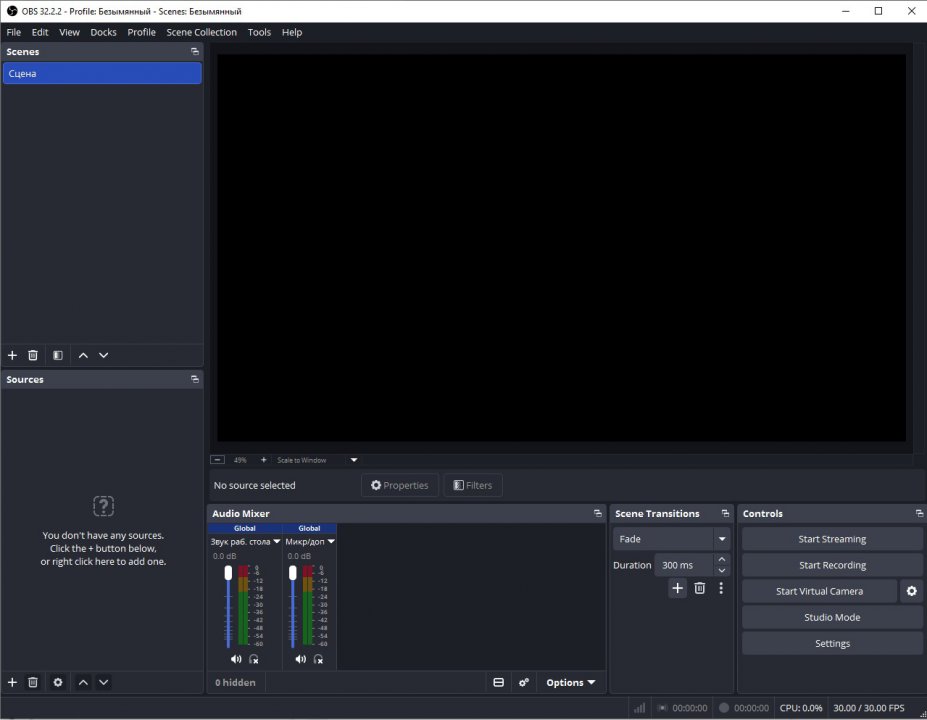
OBS Studio (Open Broadcaster Software) is a free, open-source, and cross-platform screencasting and live streaming software application. Designed for high-performance real-time video and audio capture and mixing, it allows users to compose professional scenes from various sources including window captures, images, webcams, capture cards, and gameplay. It has established itself as the industry standard for content creators, live streamers, and educators worldwide due to its robust architecture and unmatched versatility. With comprehensive support for multiple scenes, advanced audio mixing with noise suppression, and flexible encoding options, OBS Studio integrates seamlessly with major streaming platforms like Twitch, YouTube, and generic RTMP servers. Its modular user interface allows full customization of the workspace, while a rich ecosystem of plugins and scripts opens up endless possibilities for workflow automation and broadcast enhancement.
Key Features
  • Real-time Capture and Mixing: High-performance video/audio capture and composition with an unlimited number of sources, including game capture and webcams.
  • Advanced Audio Mixer: Intuitive audio mixing with per-source filters such as noise suppression, noise gate, and gain control for crystal-clear sound.
  • Modular UI and Customization: Flexible 'Dock' layout system that lets users rearrange the workspace completely to suit their production style.
  • Broad Streaming Integration: Native support and streamlined setup for popular platforms including Twitch, YouTube, and custom RTMP endpoints.
  • Extensible Plugin Architecture: Support for community-created scripts and plugins to introduce advanced automation, NDI support, and custom transitions.

How to Install / Run
  • 1
    Open your system's software catalog or package management tool.
  • 2
    Search for OBS Studio and select the installation option.
  • 3
    Launch the application and follow the automatic configuration wizard to optimize settings.

Advantages (Pros)

  • 100% free and open-source with no subscription fees, limits, or watermarks
  • Exceptional encoding performance leveraging hardware acceleration (NVENC, QuickSync)
  • Vibrant global community offering extensive documentation, plugins, and support
Disadvantages (Cons)

  • Steep learning curve for absolute beginners due to extensive technical configuration options
  • Demands adequate system hardware resources when handling multiple high-resolution sources

Images
Similar / Other Versions
No similar torrents found.
Technical Specifications
  • DeveloperOBS Project
  • Release Date14.08.2026
  • Operating System
    Windows
    1110
  • Architecture64-bit (x64)
  • Release FormatSetup / Installer Portable
  • Languages🌍🇷🇺🇬🇧🇺🇦🇩🇪🇫🇷🇪🇸
  • Official Homepageobsproject.com
  • filesView (1)
System Requirements
  • Processor (CPU)Intel Core i3 / AMD Ryzen 3 or higher
  • Memory (RAM)4 GB
  • Free Disk Space500 MB
  • Graphics Card (GPU)Standard display (No dedicated GPU required)
Rating
None
Said thanks
📢 Advertisement[+]
+ Add your advertisement
📂 files (1) ×
PathSize
OBS-Studio-32.2.2-Windows-x64-Installer.exe152.41 MB
❮
×
❯
Report Torrent ×
5 + 2 =
🌐 All Supported Languages 40
🇬🇧
English
EN
🇸🇦
Arabic العربية
AR
🇧🇬
Bulgarian Български
BG
🇪🇸
Catalan Català
CA
🇨🇿
Czech Čeština
CS
🇩🇰
Danish Dansk
DA
🇩🇪
German Deutsch
DE
🇬🇷
Greek Ελληνικά
EL
🇪🇸
Spanish Español
ES
🇪🇪
Estonian Eesti
ET
🇪🇸
Basque Euskara
EU
🇫🇮
Finnish Suomi
FI
🇫🇷
French Français
FR
🇮🇱
Hebrew עברית
HE
🇮🇳
Hindi हिन्दी
HI
🇭🇷
Croatian Hrvatski
HR
🇭🇺
Hungarian Magyar
HU
🇮🇩
Indonesian Bahasa Indonesia
ID
🇮🇹
Italian Italiano
IT
🇯🇵
Japanese 日本語
JA
🇬🇪
Georgian ქართული
KA
🇰🇷
Korean 한국어
KO
🇱🇹
Lithuanian Lietuvių
LT
🇳🇱
Dutch Nederlands
NL
🇳🇴
Norwegian Norsk
NO
🇵🇱
Polish Polski
PL
🇧🇷
Portuguese (Brazil) Português (Brasil)
PT-BR
🇵🇹
Portuguese Português
PT
🇷🇴
Romanian Română
RO
🇷🇺
Russian Русский
RU
🇸🇰
Slovak Slovenčina
SK
🇸🇮
Slovenian Slovenščina
SL
🇷🇸
Serbian Srpski
SR
🇸🇪
Swedish Svenska
SV
🇹🇭
Thai ไทย
TH
🇹🇷
Turkish Türkçe
TR
🇺🇦
Ukrainian Українська
UK
🇻🇳
Vietnamese Tiếng Việt
VI
🇨🇳
Chinese (Simplified) 简体中文
ZH-CN
🇹🇼
Chinese (Traditional) 繁體中文
ZH-TW
Total supported languages: 40