
Title
Attention Anonymous User!Your download speed is severely restricted. Registered users download at full speed without waiting. Register now!
Rufus - Tool for creating bootable USB flash drives v. 4.15
Operating Systems (OS)v. 4.15

Original Descriptions
🇱🇻Latvian
🇷🇺Russian
🇬🇧English
Instant Translation
🇩🇪Deutsch
🇪🇸Español
🇫🇷Français
🇪🇪Eesti
🇱🇹Lietuvių
🇵🇱Polski
🇺🇦Українська
🇮🇹Italiano
🇵🇹Português
🇫🇮Suomi
🇸🇪Svenska
🇳🇴Norsk
🇨🇳中文
🇯🇵日本語
Operating System
Windows
11108/8.17
Architecture
32-bit (x86)64-bit (x64)
Apraksts
Rufus ir jaudīgs un kompakts rīks, kas palīdz formatēt un izveidot sāknējamus (bootable) USB zibatmiņas diskus, piemēram, USB atmiņas kartes, īkšķdiskus un citus datu nesējus. Lietotne ir īpaši noderīga gadījumos, kad nepieciešams izveidot instalācijas datu nesējus no ISO attēliem operētājsistēmu instalēšanai, atjaunināšanai vai datora remontam. Tā atbalsta plašu mūsdienu un mantoto tehnoloģiju klāstu, nodrošinot augstu darbības ātrumu un drošību.
Pateicoties minimālistiskajam un intuitīvajam lietotāja interfeisam, Rufus ļauj lietotājiem ātri sagatavot zibatmiņas ierīces, automātiski nosakot piemērotākos parametrus, piemēram, failu sistēmu un nodalījuma shēmu (GPT vai MBR). Programma izceļas ar savu izcilo veiktspēju, bieži vien pārspējot līdzīgus rīkus vairākkārt, un tai nav nepieciešama instalēšana, jo tā darbojas kā portatīvā lietotne.
Galvenās Funkcijas
- Sāknējamu USB izveide: Ātri un efektīvi izveidojiet instalācijas USB no Windows un Linux ISO attēliem.
- Liels ātrums: Darbojas ievērojami ātrāk nekā līdzīgi rīki, piemēram, Windows USB/DVD Download Tool.
- Atbalsts vecām un jaunām sistēmām: Pilns atbalsts UEFI un BIOS, kā arī GPT un MBR nodalījumu shēmām.
- DOS un FreeDOS atbalsts: Iespēja izveidot DOS sāknējamus diskus vecāku programmu vai BIOS atjauninājumu palaišanai.
- Portatīvā versija: Programma neprasa instalēšanu un ir gatava lietošanai uzreiz pēc lejupielādes.
How to Install / Run
- 1Lejupielādējiet oficiālo Rufus izpildāmo failu savā datorā.
- 2Pievienojiet datoram savu USB zibatmiņas disku.
- 3Palaidiet Rufus, izvēlieties vajadzīgo ISO failu un noklikšķiniet uz 'Sākt'.
Plusi / Priekšrocības
- Pilnīgi bezmaksas un atvērtā pirmkoda programmatūra.
- Ļoti ātra un efektīva darbība.
- Kompakts izmērs un nav nepieciešama instalācija.
- Automātiska aparatūras un ISO failu parametru noteikšana.
Mīnusi / Ierobežojumi
- Pieejams tikai operētājsistēmai Microsoft Windows.
- Neuzmanīgi lietojot, var nejauši izdzēst datus no nepareizā USB diska.
Описание
Rufus — это мощная и компактная утилита, которая помогает форматировать и создавать загрузочные USB-накопители, такие как флешки, карты памяти и другие портативные носители данных. Приложение невероятно полезно для создания установочных носителей из ISO-образов при развертывании операционных систем, обновлении прошивок или системном обслуживании. Инструмент обеспечивает полную поддержку как современных систем UEFI, так и устаревших BIOS.
Обладая лаконичным и интуитивно понятным интерфейсом, Rufus позволяет быстро настроить схему разделов (GPT или МBR), целевую систему и файловую систему. Программа отличается выдающейся скоростью работы, часто превосходя аналоги в несколько раз, а также не требует установки, функционируя как полноценное портативное приложение.
Ключевые Особенности
- Создание загрузочных USB: Быстрое и эффективное создание установочных флешек из ISO-образов Windows и Linux.
- Высокая производительность: Работает значительно быстрее аналогичных инструментов для записи образов.
- Широкая совместимость: Полная поддержка UEFI и BIOS, а также схем разделов GPT и MBR.
- Поддержка DOS и FreeDOS: Возможность создания загрузочных дисков для запуска старых утилит и прошивки BIOS.
- Портативность: Программа не требует установки на жесткий диск и готова к работе сразу после запуска.
How to Install / Run
- 1Загрузите официальный исполняемый файл Rufus на свой компьютер.
- 2Подключите USB-накопитель к свободному порту компьютера.
- 3Запустите Rufus, выберите необходимый ISO-образ и нажмите кнопку 'Старт'.
Преимущества (Плюсы)
- Бесплатный инструмент с открытым исходным кодом без рекламы.
- Исключительно высокая скорость создания загрузочных носителей.
- Компактный размер и отсутствие необходимости установки.
- Продвинутые параметры настройки для опытных пользователей.
Недостатки (Минусы)
- Официальная версия доступна только для операционной системы Windows.
- Ошибочный выбор диска может привести к стиранию нужных данных.
📋 BASIC INFORMATION:
⚙️ SYSTEM REQUIREMENTS (Windows):
Please verify your system meets these minimum requirements.
It is an indispensable tool for installing operating systems such as Windows or Linux, working on system recovery setups, or flashing BIOS/firmware from DOS.
Despite its tiny footprint, Rufus delivers unmatched speed, full UEFI and Legacy BIOS support, and convenient tweaks for bypassing Windows 11 installation restrictions.
- License: 100% FREE (GNU GPLv3 / Fully Legal).
- Operating System: Windows (64-bit).
- Format: Installer.
- Languages: Multilingual (Includes Latvian, English, Russian and other languages).
⚙️ SYSTEM REQUIREMENTS (Windows):
Please verify your system meets these minimum requirements.
- Operating System: Windows (64-bit).
- Processor (CPU): 1 GHz or faster x86/x64 processor.
- Memory (RAM): 8 MB RAM.
- Free Disk Space: 20 MB free space.
- Graphics Card (GPU): Standard display (No dedicated GPU required).
How to Install / Run
- 1Ensure you are running Windows 8 or later and execute the downloaded application executable.
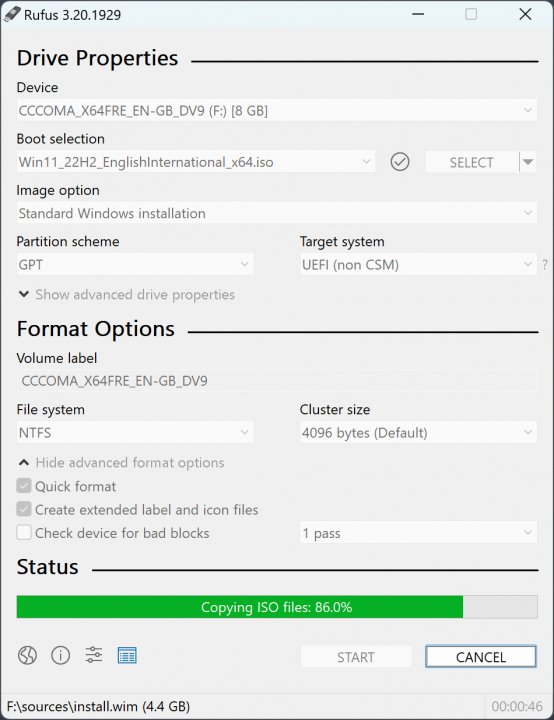
- 2Insert your USB flash drive, select it from the device menu, and choose your source ISO image.
- 3Select the target partition scheme (GPT for UEFI or MBR for BIOS) and click Start to generate the drive.
Description
Rufus is a widely popular, lightweight, and open-source utility designed to format and create bootable USB flash drives from ISO images.
It is an indispensable tool for installing operating systems such as Windows or Linux, working on system recovery setups, or flashing BIOS/firmware from DOS.
Despite its tiny footprint, Rufus delivers unmatched speed, full UEFI and Legacy BIOS support, and convenient tweaks for bypassing Windows 11 installation restrictions.
Key Features
- Exceptional Speed: Rufus formats and creates bootable drives up to twice as fast as competing tools like UNetbootin.
- UEFI and Legacy Support: Fully supports modern UEFI setups alongside traditional Legacy BIOS target systems.
- Windows 11 Customization: Allows users to bypass TPM 2.0, Secure Boot, RAM minimums, and online Microsoft account mandates.
- Open Source: Fully free and released under the GNU General Public License v3 for maximum safety and transparency.
- Multiple Filesystem Options: Offers support for FAT32, NTFS, exFAT, UDF, and ReFS drive formats.
📋 BASIC INFORMATION:
⚙️ SYSTEM REQUIREMENTS (Windows):
Please verify your system meets these minimum requirements.
It is an indispensable tool for installing operating systems such as Windows or Linux, working on system recovery setups, or flashing BIOS/firmware from DOS.
Despite its tiny footprint, Rufus delivers unmatched speed, full UEFI and Legacy BIOS support, and convenient tweaks for bypassing Windows 11 installation restrictions.
- License: 100% FREE (GNU GPLv3 / Fully Legal).
- Operating System: Windows (64-bit).
- Format: Installer.
- Languages: Multilingual (Includes Latvian, English, Russian and other languages).
⚙️ SYSTEM REQUIREMENTS (Windows):
Please verify your system meets these minimum requirements.
- Operating System: Windows (64-bit).
- Processor (CPU): 1 GHz or faster x86/x64 processor.
- Memory (RAM): 8 MB RAM.
- Free Disk Space: 20 MB free space.
- Graphics Card (GPU): Standard display (No dedicated GPU required).
How to Install / Run
- 1Ensure you are running Windows 8 or later and execute the downloaded application executable.
- 2Insert your USB flash drive, select it from the device menu, and choose your source ISO image.
- 3Select the target partition scheme (GPT for UEFI or MBR for BIOS) and click Start to generate the drive.
Description
Rufus is a widely popular, lightweight, and open-source utility designed to format and create bootable USB flash drives from ISO images.
It is an indispensable tool for installing operating systems such as Windows or Linux, working on system recovery setups, or flashing BIOS/firmware from DOS.
Despite its tiny footprint, Rufus delivers unmatched speed, full UEFI and Legacy BIOS support, and convenient tweaks for bypassing Windows 11 installation restrictions.
Key Features
- Exceptional Speed: Rufus formats and creates bootable drives up to twice as fast as competing tools like UNetbootin.
- UEFI and Legacy Support: Fully supports modern UEFI setups alongside traditional Legacy BIOS target systems.
- Windows 11 Customization: Allows users to bypass TPM 2.0, Secure Boot, RAM minimums, and online Microsoft account mandates.
- Open Source: Fully free and released under the GNU General Public License v3 for maximum safety and transparency.
- Multiple Filesystem Options: Offers support for FAT32, NTFS, exFAT, UDF, and ReFS drive formats.
📋 BASIC INFORMATION:
⚙️ SYSTEM REQUIREMENTS (Windows):
Please verify your system meets these minimum requirements.
It is an indispensable tool for installing operating systems such as Windows or Linux, working on system recovery setups, or flashing BIOS/firmware from DOS.
Despite its tiny footprint, Rufus delivers unmatched speed, full UEFI and Legacy BIOS support, and convenient tweaks for bypassing Windows 11 installation restrictions.
- License: 100% FREE (GNU GPLv3 / Fully Legal).
- Operating System: Windows (64-bit).
- Format: Installer.
- Languages: Multilingual (Includes Latvian, English, Russian and other languages).
⚙️ SYSTEM REQUIREMENTS (Windows):
Please verify your system meets these minimum requirements.
- Operating System: Windows (64-bit).
- Processor (CPU): 1 GHz or faster x86/x64 processor.
- Memory (RAM): 8 MB RAM.
- Free Disk Space: 20 MB free space.
- Graphics Card (GPU): Standard display (No dedicated GPU required).
How to Install / Run
- 1Ensure you are running Windows 8 or later and execute the downloaded application executable.
- 2Insert your USB flash drive, select it from the device menu, and choose your source ISO image.
- 3Select the target partition scheme (GPT for UEFI or MBR for BIOS) and click Start to generate the drive.
Description
Rufus is a widely popular, lightweight, and open-source utility designed to format and create bootable USB flash drives from ISO images.
It is an indispensable tool for installing operating systems such as Windows or Linux, working on system recovery setups, or flashing BIOS/firmware from DOS.
Despite its tiny footprint, Rufus delivers unmatched speed, full UEFI and Legacy BIOS support, and convenient tweaks for bypassing Windows 11 installation restrictions.
Key Features
- Exceptional Speed: Rufus formats and creates bootable drives up to twice as fast as competing tools like UNetbootin.
- UEFI and Legacy Support: Fully supports modern UEFI setups alongside traditional Legacy BIOS target systems.
- Windows 11 Customization: Allows users to bypass TPM 2.0, Secure Boot, RAM minimums, and online Microsoft account mandates.
- Open Source: Fully free and released under the GNU General Public License v3 for maximum safety and transparency.
- Multiple Filesystem Options: Offers support for FAT32, NTFS, exFAT, UDF, and ReFS drive formats.
LICENSE PERMISSIONS & LEGAL REFERENCE
- Public Distribution Permission: OFFICIALLY PERMITTED TO REDISTRIBUTE (100% Legal Release)
(Guaranteed rights to freely download, copy, and share in unmodified form under open-source / freeware terms). - License Model & Status: GNU General Public License v3.0 or later.
- Official Distribution Permission: Under the official Rufus - Tool for creating bootable USB flash drives license (GPLv3), this software is free and permits unrestricted downloading and distribution.
- Official Project Homepage: https://rufus.ie.
- Exact License & Terms Link: https://www.gnu.org/licenses/gpl-3.0.html.
- Official License Registry (Alternative Legal Source): https://rufus.ie/.
Images
Similar / Other Versions
No similar torrents found.
Technical Specifications
- DeveloperPete Batard
- Release Date30.06.2026
- Operating SystemWindows11108/8.17
- Architecture32-bit (x86) 64-bit (x64)
- Release FormatSetup / Installer Portable
- Languages🌍🇱🇻🇷🇺🇬🇧🇺🇦🇩🇪🇫🇷
- Official Homepagerufus.ie
- filesView (1)
System Requirements
- Processor (CPU)1 GHz
- Memory (RAM)512 MB
- Free Disk Space50 MB
- Graphics Card (GPU)Standard display (No dedicated GPU required)
Rating
None
Said thanks
📢 Advertisement[+]
Want to be seen by everyone?Place your ad here using your site balance! The perfect spot to promote your releases, clan, or links.Your text ad here!Grab this spot using your accumulated balance and get noticed.VPNMost people overpay for a VPN without realising it. CometVPN starts from just $1.89/month — same privacy, same security, same speeds as the big names. Just without the big price tag.
+ Add your advertisement
📂 files (1)
×
| Path | Size |
|---|---|
| rufus-4.15.exe | 1.90 MB |
❮
×
![]()
❯
Share on Facebook
Choose the image you want to see in your Facebook post:
Choose which image you want to see in your Facebook post and click "Share this image":
 Screenshot 1
 Screenshot 2
Facebook will automatically load the selected image in your post preview!
Facebook will automatically load the chosen image in the post preview.
🌐 All Supported Languages 46
🇦🇱
SQ
🇸🇦
AR
🇦🇲
HY
🇦🇿
AZ
🇪🇸
EU
🇧🇾
BE
🇧🇦
BS
🇧🇬
BG
🇪🇸
CA
🇨🇳
ZH
🇭🇷
HR
🇨🇿
CS
🇩🇰
DA
🇳🇱
NL
🇬🇧
EN
🇪🇪
ET
🇫🇮
FI
🇫🇷
FR
🇪🇸
GL
🇩🇪
DE
🇬🇷
EL
🇮🇱
HE
🇭🇺
HU
🇮🇩
ID
🇮🇹
IT
🇯🇵
JA
🇰🇷
KO
🇱🇻
LV
🇱🇹
LT
🇲🇾
MS
🇳🇴
NO
🇮🇷
FA
🇵🇱
PL
🇵🇹
PT
🇷🇴
RO
🇷🇺
RU
🇷🇸
SR
🇸🇰
SK
🇸🇮
SL
🇪🇸
ES
🇸🇪
SV
🇹🇭
TH
🇹🇷
TR
🇺🇦
UK
🇺🇿
UZ
🇻🇳
VI
No matching languages found
Total supported languages: 46