
Title
Attention Anonymous User!Your download speed is severely restricted. Registered users download at full speed without waiting. Register now!

OBS Studio v. 32.2.2
Video Editing & Playersv. 32.2.2

Original Descriptions
🇱🇻Latvian
🇷🇺Russian
🇬🇧English
Instant Translation
🇩🇪Deutsch
🇪🇸Español
🇫🇷Français
🇪🇪Eesti
🇱🇹Lietuvių
🇵🇱Polski
🇺🇦Українська
🇮🇹Italiano
🇵🇹Português
🇫🇮Suomi
🇸🇪Svenska
🇳🇴Norsk
🇨🇳中文
🇯🇵日本語
Operating System
Windows
1110
Architecture
64-bit (x64)
Apraksts
OBS Studio (Open Broadcaster Software) ir bezmaksas un atvērtā pirmkoda, daudzplatformu ekrāna ierakstīšanas un tiešraides straumēšanas programmatūra. Tā nodrošina augstas veiktspējas reāllaika video un audio uztveršanu un miksēšanu, ļaujot lietotājiem izveidot sarežģītas kompozīcijas no dažādiem avotiem, tostarp logiem, attēliem, tīmekļa kamerām, datu nesējiem un spēļu procesiem. Programma ir kļuvusi par standartu satura veidotāju, spēlētāju un izglītības iestāžu vidū pateicoties tās elastīgumam un stabilajai arhitektūrai. Pateicoties plašajam funkciju klāstam, OBS Studio atbalsta neierobežotu skaitu ainavu un skaņas celiņu, nodrošinot intuitīvu audio mikseri ar trokšņu slāpēšanu un filtriem. Tā nemanāmi integrējas ar populārākajām straumēšanas platformām, piemēram, Twitch, YouTube un citiem RTMP pakalpojumiem. Modulārā saskarne ļauj pielāgot darba vidi katra lietotāja individuālajām vajadzībām, savukārt paplašinājumu un spraudņu atbalsts paver durvis gandrīz neierobežotai funkcionalitātes paplašināšanai.
Galvenās Funkcijas
- Reāllaika video un audio uztveršana: Augstas veiktspējas satura veidošana un miksēšana ar neierobežotu avotu skaitu, ieskaitot spēles un kameru straumes.
- Intuitīvs audio mikseris: Iebūvēti audio filtri, piemēram, vārtu trokšņu slāpētājs, kompresors un ekvalaizers katram celiņam.
- Pielāgojama saskarne: Modulārs 'Dock' izkārtojums, kas ļauj sakārtot darba logus un rīkus atbilstoši personīgajām vēlmēm.
- Plašs platformu atbalsts: Nevainojama integrācija ar Twitch, YouTube, Facebook un citiem straumēšanas tīkliem, izmantojot RTMP protokolu.
- Paplašināmība ar spraudņiem: Atbalsts plašam kopienas radītu spraudņu un skriptu klāstam, lai automatizētu un uzlabotu producēšanas procesus.
How to Install / Run
- 1Atveriet lietotņu kataloga vai sistēmas iebūvēto instalēšanas rīku.
- 2Atrodiet OBS Studio un noklikšķiniet uz instalēšanas pogas.
- 3Palaidiet programmu un izmantojiet automātisko konfigurācijas vedni iestatījumu pielāgošanai.
Plusi / Priekšrocības
- Pilnīgi bezmaksas un atvērtā pirmkoda programmatūra bez slēptiem maksājumiem vai ūdenszīmēm
- Ļoti augsta veiktspēja un aparatūras paātrinājuma atbalsts efektīvai kodēšanai
- Aktīva un liela kopiena, kas pastāvīgi attīsta jaunus spraudņus un sniedz atbalstu
Mīnusi / Ierobežojumi
- Stāva apgūšanas līkne iesācējiem daudzo tehnisko iestatījumu dēļ
- Nepieciešama salīdzinoši jaudīga aparatūra sarežģītu straumu kodēšanai reāllaikā
Описание
OBS Studio (Open Broadcaster Software) — это бесплатное приложение с открытым исходным кодом для записи экранов и проведения прямых трансляций на различных платформах. Программа обеспечивает высокопроизводительный захват и микширование видео и аудио в реальном времени, позволяя создавать сложные композиции из различных источников, включая захват окон, изображения, веб-камеры, платы захвата и игровой процесс. Благодаря надежной архитектуре и непревзойденной гибкости она стала отраслевым стандартом для создателей контента, стримеров и преподавателей по всему миру. Обладая поддержкой множества сцен, продвинутым аудиомикшером с шумоподавлением и гибкими параметрами кодирования, OBS Studio легко интегрируется с основными стриминговыми платформами, такими как Twitch, YouTube и произвольными RTMP-серверами. Модульный пользовательский интерфейс позволяет полностью настраивать рабочее пространство под индивидуальные потребности, а богатая экосистема плагинов и скриптов открывает практически безграничные возможности для автоматизации и улучшения трансляций.
Ключевые Особенности
- Захват и микширование в реальном времени: Высокопроизводительный процесс создания контента с неограниченным числом источников, включая захват игр и видеопотоков.
- Продвинутый аудиомикшер: Интуитивное управление звуком с поканальными фильтрами, такими как шумоподавление, нойз-гейт и эквалайзер.
- Модульный интерфейс: Гибкая система доков, позволяющая полностью перестраивать рабочее пространство под ваш стиль работы.
- Интеграция с платформами: Поддержка настройки для Twitch, YouTube, Facebook и любых других сервисов по протоколу RTMP.
- Расширяемая архитектура: Поддержка сторонних плагинов и скриптов для внедрения автоматизации, кастомных переходов и NDI.
How to Install / Run
- 1Откройте каталог приложений или менеджер пакетов вашей системы.
- 2Найдите OBS Studio и нажмите кнопку установки.
- 3Запустите приложение и воспользуйтесь мастером автоматической настройки параметров.
Преимущества (Плюсы)
- Полностью бесплатная программа с открытым исходным кодом без скрытых платежей и водяных знаков
- Высокая производительность кодирования с поддержкой аппаратного ускорения (NVENC, QuickSync)
- Активное сообщество разработчиков, создающих полезные плагины и обучающие материалы
Недостатки (Минусы)
- Сложность в освоении для новичков из-за обилия технических настроек
- Требовательность к аппаратным ресурсам компьютера при работе со множеством источников высокого разрешения
Description
OBS Studio (Open Broadcaster Software) is a free, open-source, and cross-platform screencasting and live streaming software application. Designed for high-performance real-time video and audio capture and mixing, it allows users to compose professional scenes from various sources including window captures, images, webcams, capture cards, and gameplay. It has established itself as the industry standard for content creators, live streamers, and educators worldwide due to its robust architecture and unmatched versatility. With comprehensive support for multiple scenes, advanced audio mixing with noise suppression, and flexible encoding options, OBS Studio integrates seamlessly with major streaming platforms like Twitch, YouTube, and generic RTMP servers. Its modular user interface allows full customization of the workspace, while a rich ecosystem of plugins and scripts opens up endless possibilities for workflow automation and broadcast enhancement.
Key Features
- Real-time Capture and Mixing: High-performance video/audio capture and composition with an unlimited number of sources, including game capture and webcams.
- Advanced Audio Mixer: Intuitive audio mixing with per-source filters such as noise suppression, noise gate, and gain control for crystal-clear sound.
- Modular UI and Customization: Flexible 'Dock' layout system that lets users rearrange the workspace completely to suit their production style.
- Broad Streaming Integration: Native support and streamlined setup for popular platforms including Twitch, YouTube, and custom RTMP endpoints.
- Extensible Plugin Architecture: Support for community-created scripts and plugins to introduce advanced automation, NDI support, and custom transitions.
How to Install / Run
- 1Open your system's software catalog or package management tool.
- 2Search for OBS Studio and select the installation option.
- 3Launch the application and follow the automatic configuration wizard to optimize settings.
Advantages (Pros)
- 100% free and open-source with no subscription fees, limits, or watermarks
- Exceptional encoding performance leveraging hardware acceleration (NVENC, QuickSync)
- Vibrant global community offering extensive documentation, plugins, and support
Disadvantages (Cons)
- Steep learning curve for absolute beginners due to extensive technical configuration options
- Demands adequate system hardware resources when handling multiple high-resolution sources
Description
OBS Studio (Open Broadcaster Software) is a free, open-source, and cross-platform screencasting and live streaming software application. Designed for high-performance real-time video and audio capture and mixing, it allows users to compose professional scenes from various sources including window captures, images, webcams, capture cards, and gameplay. It has established itself as the industry standard for content creators, live streamers, and educators worldwide due to its robust architecture and unmatched versatility. With comprehensive support for multiple scenes, advanced audio mixing with noise suppression, and flexible encoding options, OBS Studio integrates seamlessly with major streaming platforms like Twitch, YouTube, and generic RTMP servers. Its modular user interface allows full customization of the workspace, while a rich ecosystem of plugins and scripts opens up endless possibilities for workflow automation and broadcast enhancement.
Key Features
- Real-time Capture and Mixing: High-performance video/audio capture and composition with an unlimited number of sources, including game capture and webcams.
- Advanced Audio Mixer: Intuitive audio mixing with per-source filters such as noise suppression, noise gate, and gain control for crystal-clear sound.
- Modular UI and Customization: Flexible 'Dock' layout system that lets users rearrange the workspace completely to suit their production style.
- Broad Streaming Integration: Native support and streamlined setup for popular platforms including Twitch, YouTube, and custom RTMP endpoints.
- Extensible Plugin Architecture: Support for community-created scripts and plugins to introduce advanced automation, NDI support, and custom transitions.
How to Install / Run
- 1Open your system's software catalog or package management tool.
- 2Search for OBS Studio and select the installation option.
- 3Launch the application and follow the automatic configuration wizard to optimize settings.
Advantages (Pros)
- 100% free and open-source with no subscription fees, limits, or watermarks
- Exceptional encoding performance leveraging hardware acceleration (NVENC, QuickSync)
- Vibrant global community offering extensive documentation, plugins, and support
Disadvantages (Cons)
- Steep learning curve for absolute beginners due to extensive technical configuration options
- Demands adequate system hardware resources when handling multiple high-resolution sources
Description
OBS Studio (Open Broadcaster Software) is a free, open-source, and cross-platform screencasting and live streaming software application. Designed for high-performance real-time video and audio capture and mixing, it allows users to compose professional scenes from various sources including window captures, images, webcams, capture cards, and gameplay. It has established itself as the industry standard for content creators, live streamers, and educators worldwide due to its robust architecture and unmatched versatility. With comprehensive support for multiple scenes, advanced audio mixing with noise suppression, and flexible encoding options, OBS Studio integrates seamlessly with major streaming platforms like Twitch, YouTube, and generic RTMP servers. Its modular user interface allows full customization of the workspace, while a rich ecosystem of plugins and scripts opens up endless possibilities for workflow automation and broadcast enhancement.
Key Features
- Real-time Capture and Mixing: High-performance video/audio capture and composition with an unlimited number of sources, including game capture and webcams.
- Advanced Audio Mixer: Intuitive audio mixing with per-source filters such as noise suppression, noise gate, and gain control for crystal-clear sound.
- Modular UI and Customization: Flexible 'Dock' layout system that lets users rearrange the workspace completely to suit their production style.
- Broad Streaming Integration: Native support and streamlined setup for popular platforms including Twitch, YouTube, and custom RTMP endpoints.
- Extensible Plugin Architecture: Support for community-created scripts and plugins to introduce advanced automation, NDI support, and custom transitions.
How to Install / Run
- 1Open your system's software catalog or package management tool.
- 2Search for OBS Studio and select the installation option.
- 3Launch the application and follow the automatic configuration wizard to optimize settings.
Advantages (Pros)
- 100% free and open-source with no subscription fees, limits, or watermarks
- Exceptional encoding performance leveraging hardware acceleration (NVENC, QuickSync)
- Vibrant global community offering extensive documentation, plugins, and support
Disadvantages (Cons)
- Steep learning curve for absolute beginners due to extensive technical configuration options
- Demands adequate system hardware resources when handling multiple high-resolution sources
LICENSE PERMISSIONS & LEGAL REFERENCE
- Public Distribution Permission: OFFICIALLY PERMITTED TO REDISTRIBUTE (100% Legal Release)
(Guaranteed rights to freely download, copy, and share in unmodified form under open-source / freeware terms). - License Model & Status: GNU General Public License v2.0 or later.
- Official Distribution Permission: Under the official OBS Studio license (GPL-2.0-or-later), this software is free and permits unrestricted downloading and distribution.
- Official Project Homepage: https://obsproject.com.
- Exact License & Terms Link: https://www.gnu.org/licenses/gpl-2.0.html.
- Official License Registry (Alternative Legal Source): https://opensource.org/licenses/GPL-2.0.
Images
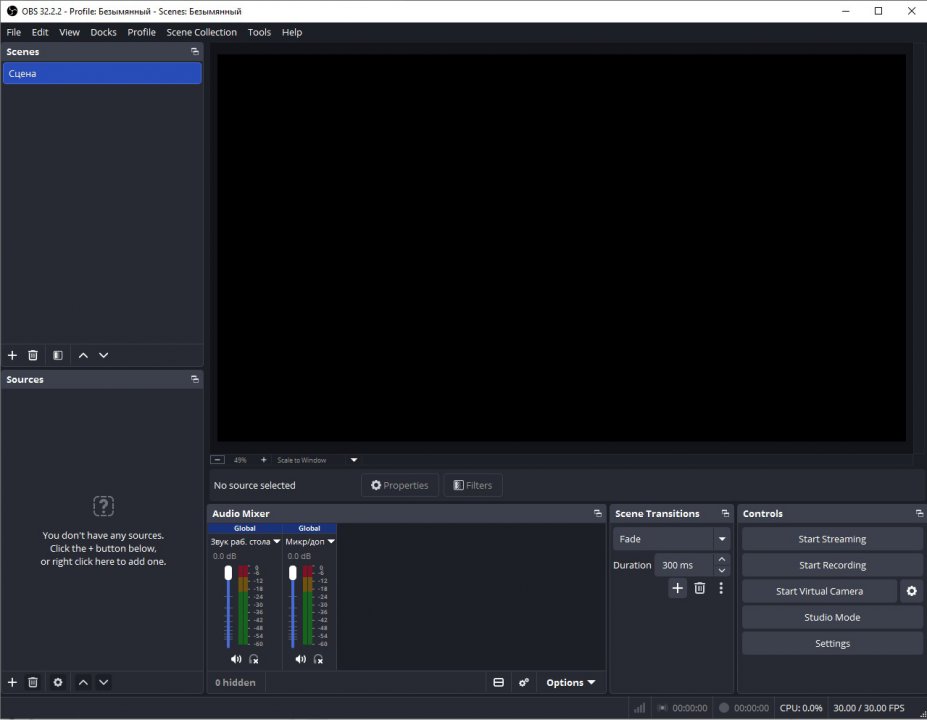
Similar / Other Versions
No similar torrents found.
Technical Specifications
- DeveloperOBS Project
- Release Date14.08.2026
- Operating SystemWindows1110
- Architecture64-bit (x64)
- Release FormatSetup / Installer Portable
- Languages🌍🇷🇺🇬🇧🇺🇦🇩🇪🇫🇷🇪🇸
- Official Homepageobsproject.com
- filesView (1)
System Requirements
- Processor (CPU)Intel Core i3 / AMD Ryzen 3 or higher
- Memory (RAM)4 GB
- Free Disk Space500 MB
- Graphics Card (GPU)Standard display (No dedicated GPU required)
Rating
None
Said thanks
📢 Advertisement[+]
Want to be seen by everyone?Place your ad here using your site balance! The perfect spot to promote your releases, clan, or links.Your text ad here!Grab this spot using your accumulated balance and get noticed.VPNMost people overpay for a VPN without realising it. CometVPN starts from just $1.89/month — same privacy, same security, same speeds as the big names. Just without the big price tag.
+ Add your advertisement
📂 files (1)
×
| Path | Size |
|---|---|
| OBS-Studio-32.2.2-Windows-x64-Installer.exe | 152.41 MB |
❮
×
![]()
❯
Share on Facebook
Choose the image you want to see in your Facebook post:
Choose which image you want to see in your Facebook post and click "Share this image":
 Screenshot 1
 Screenshot 2
Facebook will automatically load the selected image in your post preview!
Facebook will automatically load the chosen image in the post preview.
🌐 All Supported Languages 40
🇬🇧
English
EN
🇸🇦
Arabic
العربية
AR
🇧🇬
Bulgarian
Български
BG
🇪🇸
Catalan
Català
CA
🇨🇿
Czech
Čeština
CS
🇩🇰
Danish
Dansk
DA
🇩🇪
German
Deutsch
DE
🇬🇷
Greek
Ελληνικά
EL
🇪🇸
Spanish
Español
ES
🇪🇪
Estonian
Eesti
ET
🇪🇸
Basque
Euskara
EU
🇫🇮
Finnish
Suomi
FI
🇫🇷
French
Français
FR
🇮🇱
Hebrew
עברית
HE
🇮🇳
Hindi
हिन्दी
HI
🇭🇷
Croatian
Hrvatski
HR
🇭🇺
Hungarian
Magyar
HU
🇮🇩
Indonesian
Bahasa Indonesia
ID
🇮🇹
Italian
Italiano
IT
🇯🇵
Japanese
日本語
JA
🇬🇪
Georgian
ქართული
KA
🇰🇷
Korean
한국어
KO
🇱🇹
Lithuanian
Lietuvių
LT
🇳🇱
Dutch
Nederlands
NL
🇳🇴
Norwegian
Norsk
NO
🇵🇱
Polish
Polski
PL
🇧🇷
Portuguese (Brazil)
Português (Brasil)
PT-BR
🇵🇹
Portuguese
Português
PT
🇷🇴
Romanian
Română
RO
🇷🇺
Russian
Русский
RU
🇸🇰
Slovak
Slovenčina
SK
🇸🇮
Slovenian
Slovenščina
SL
🇷🇸
Serbian
Srpski
SR
🇸🇪
Swedish
Svenska
SV
🇹🇭
Thai
ไทย
TH
🇹🇷
Turkish
Türkçe
TR
🇺🇦
Ukrainian
Українська
UK
🇻🇳
Vietnamese
Tiếng Việt
VI
🇨🇳
Chinese (Simplified)
简体中文
ZH-CN
🇹🇼
Chinese (Traditional)
繁體中文
ZH-TW
No matching languages found
Total supported languages: 40