
Title
Attention Anonymous User!Your download speed is severely restricted. Registered users download at full speed without waiting. Register now!
VLC Media Player v. 3.0.23
Video Editing & Playersv. 3.0.23

Original Descriptions
🇱🇻Latvian
🇷🇺Russian
🇬🇧English
Instant Translation
🇩🇪Deutsch
🇪🇸Español
🇫🇷Français
🇪🇪Eesti
🇱🇹Lietuvių
🇵🇱Polski
🇺🇦Українська
🇮🇹Italiano
🇵🇹Português
🇫🇮Suomi
🇸🇪Svenska
🇳🇴Norsk
🇨🇳中文
🇯🇵日本語
Operating System
Windows
11108/8.17
Architecture
64-bit (x64)
Apraksts
VLC Media Player ir bezmaksas, atvērtā pirmkoda, portatīva un starpplatformu multivides atskaņotāja programmatūra un straumēšanas multivides serveris, ko izstrādājis VideoLAN projekts. Tas atbalsta gandrīz visus zināmos audio un video kompresijas metodes un failu formātus, tostarp DVD-Video, Video CD un dažādus straumēšanas protokolus, novēršot nepieciešamību meklēt un instalēt papildu vai patentētus spraudņus.Pateicoties iebūvētajām kodēšanas un dekodēšanas bibliotēkām, lietotāji var viegli atskaņot pat bojātus, nepilnīgus vai neapstrādātus multivides failus tieši no tīkla diskiem vai ierīcēm. Programma piedāvā arī iespēju straumēt multivides failus datortīklos un veikt failu transkodēšanu uz citiem formātiem, nodrošinot augstu elastību gan ikdienas lietotājiem, gan profesionāļiem.
VLC ir pieejams plašam operētājsistēmu lokam, aptverot gan darbvirsmas, gan mobilās platformas, piemēram, Android, iOS un iPadOS, kā arī ir atrodams galvenajos lietotņu veikalos. Tā vienkāršais, bet jaudīgais interfeiss un stabilā darbība padara to par vienu no uzticamākajiem multivides atskaņotājiem pasaulē.
Galvenās Funkcijas
- Plašs formātu atbalsts: Atskaņo gandrīz visus video un audio failu formātus, diskus un straumēšanas protokolus bez papildu kodekiem.
- Straumēšanas iespējas: Ļauj straumēt multivides saturu pāri datortīkliem vai darboties kā straumēšanas serverim.
- Multivides transkodēšana: Pārvērš audio un video failus citos formātos tieši programmas saskarnē.
- Iebūvēti kodeki: Noklusējuma instalācija ietver daudzas bezmaksas dekodēšanas un kodēšanas bibliotēkas, novēršot vajadzību pēc ārējiem spraudņiem.
- Starpplatformu saderība: Pieejams darbvirsmas un mobilajām operētājsistēmām, tostarp Windows, macOS, Linux, Android un iOS.
How to Install / Run
- 1Atveriet lietotņu pārvaldnieku vai programmatūras katalogu savā ierīcē.
- 2Meklējiet "VLC Media Player" un atlasiet oficiālo VideoLAN lietotni.
- 3Noklikšķiniet uz instalēšanas pogas un pagaidiet, līdz process ir pabeigts, pēc kura varat sākt lietot programmu.
Plusi / Priekšrocības
- Pilnīgi bezmaksas un atvērtā pirmkoda programmatūra bez reklāmām vai slēptiem maksājumiem
- Atver gandrīz jebkuru multivides failu uzreiz pēc instalēšanas
- Ietver jaudīgus tīkla straumēšanas un transkodēšanas rīkus
- Zems sistēmas resursu patēriņš un augsta stabilitāte
Mīnusi / Ierobežojumi
- Noklusējuma lietotāja saskarne var šķist nedaudz vienkārša vai novecojusi
- Uzlabotai straumēšanas servera konfigurācijai nepieciešamas tehniskas zināšanas
Описание
VLC media player — это бесплатный и с открытым исходным кодом портативный кроссплатформенный медиаплеер и сервер потокового вещания, разработанный проектом VideoLAN. Он поддерживает огромное количество методов сжатия аудио и видео, а также файловых форматов, включая DVD-Video, Video CD и сетевые протоколы потоковой передачи, избавляя пользователей от необходимости искать и устанавливать сторонние плагины.Благодаря встроенным библиотекам декодирования и кодирования, программа позволяет легко воспроизводить поврежденные, неполные или необработанные медиафайлы напрямую с сетевых дисков или локальных накопителей. Кроме того, VLC предоставляет мощные возможности для трансляции медиаданных по компьютерным сетям и перекодирования файлов в различные альтернативные форматы, обеспечивая высокую гибкость.
VLC доступен для большинства настольных и мобильных операционных систем, таких как Android, iOS и iPadOS, а также распространяется через официальные цифровые магазины приложений. Простой, но функциональный интерфейс и высокая стабильность делают его одним из самых надежных медиаплееров в мире.
Ключевые Особенности
- Универсальная поддержка форматов: Воспроизводит практически любые аудио- и видеокодеки, контейнеры, диски и протоколы вещания без установки дополнительных кодеков.
- Сетевое вещание: Работает как клиент для просмотра потокового видео, так и как мощный сервер трансляций по сети.
- Транскодирование медиафайлов: Позволяет конвертировать мультимедиа в различные форматы прямо в интерфейсе программы.
- Встроенные библиотеки кодеков: Базовый комплект включает свободные библиотеки декодирования и кодирования, исключая поиск сторонних плагинов.
- Кроссплатформенность: Поддерживается на настольных и мобильных ОС, включая Windows, macOS, Linux, Android и iOS.
How to Install / Run
- 1Откройте менеджер пакетов или официальный магазин приложений на вашем устройстве.
- 2Найдите "VLC Media Player" и выберите официальное приложение от проекта VideoLAN.
- 3Нажмите кнопку установки и дождитесь завершения процесса, после чего запустите плеер.
Преимущества (Плюсы)
- Полностью бесплатное ПО с открытым исходным кодом без рекламы и платных подписок
- Воспроизводит поврежденные, неполные или загружаемые файлы на лету
- Наличие продвинутых инструментов для настройки субтитров, фильтров и потокового вещания
- Эффективное использование системных ресурсов и высокая стабильность работы
Недостатки (Минусы)
- Интерфейс по умолчанию выглядит просто и аскетично
- Настройка продвинутых функций вещания требует технических знаний
Description
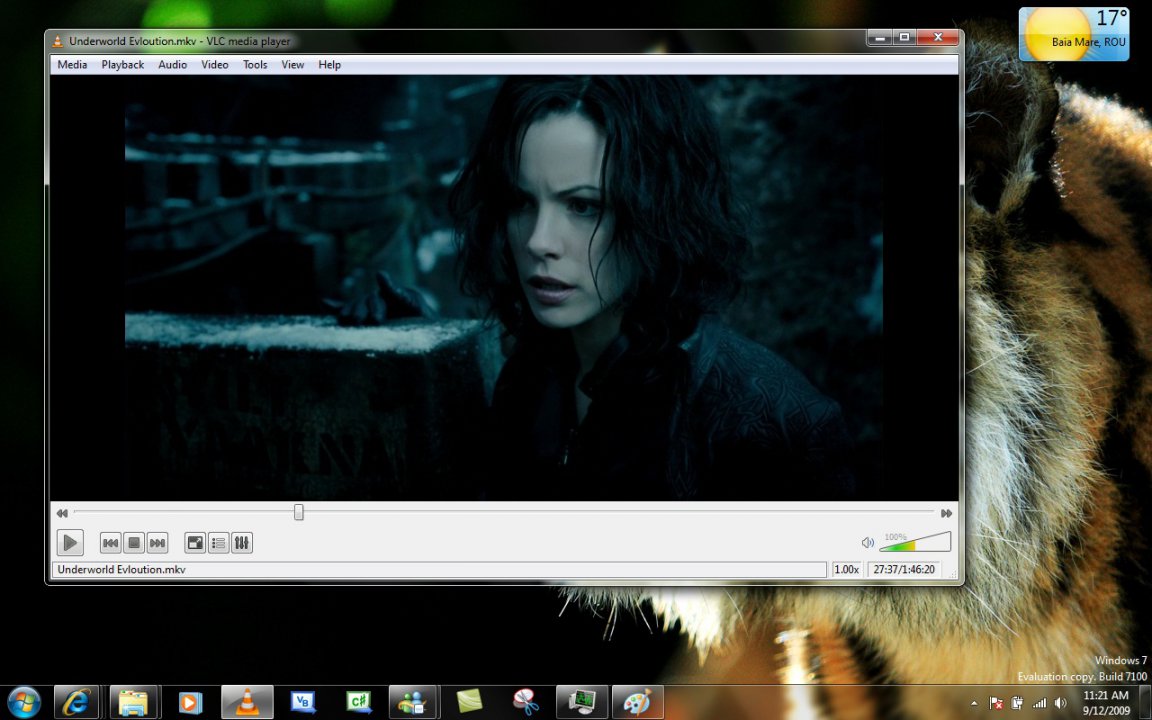
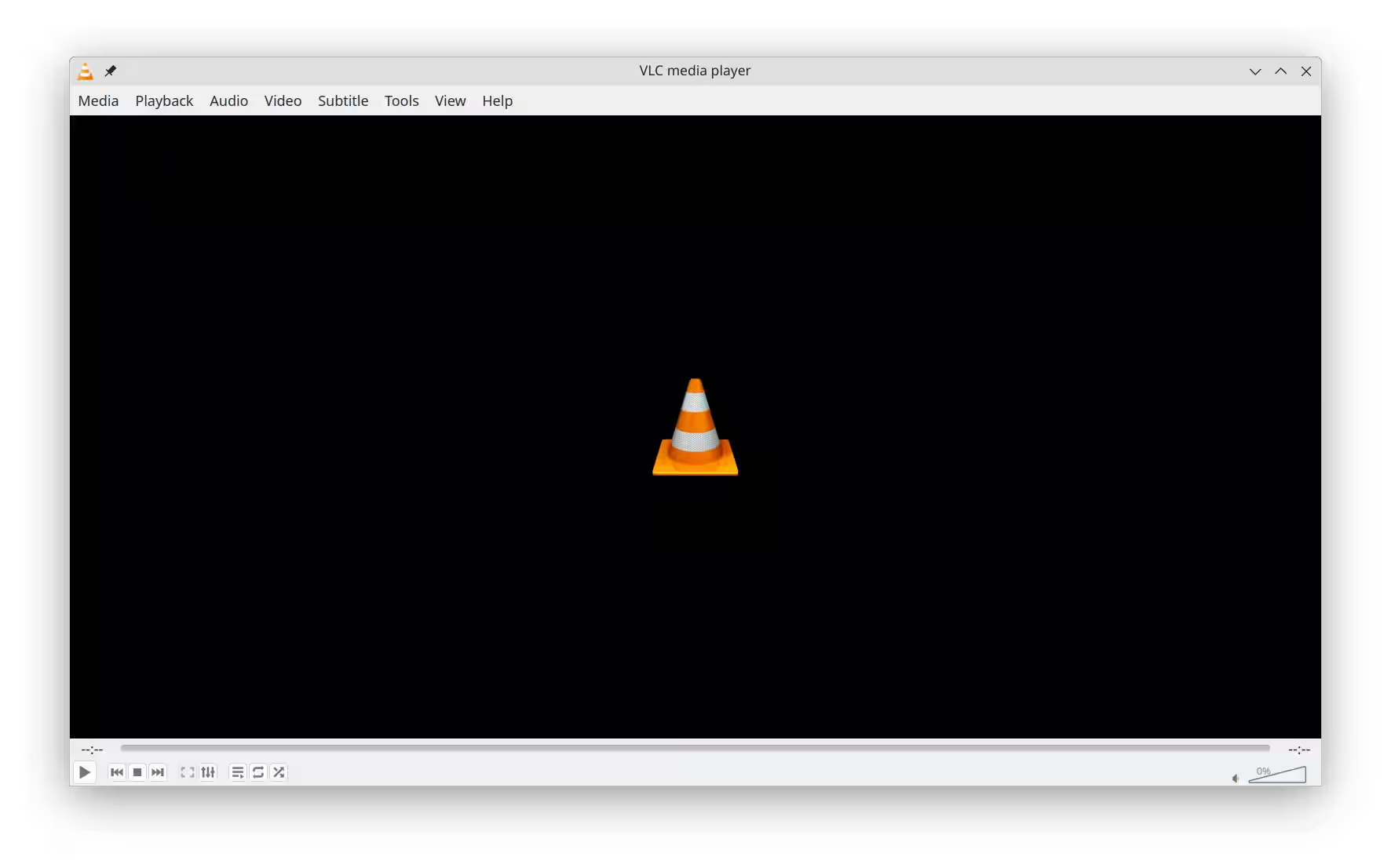
VLC media player is a free and open-source, portable, cross-platform media player software and streaming media server developed by the VideoLAN project. It supports a vast array of audio and video compression methods and file formats, including DVD-Video, Video CD, and various streaming protocols, eliminating the need to search for and install external or proprietary plugins.Thanks to its built-in decoding and encoding libraries, users can effortlessly play back even damaged, incomplete, or raw media files directly from network shares or local drives. The software also provides robust capabilities for streaming media over computer networks and transcoding multimedia files into alternative formats, ensuring high flexibility for both casual users and professionals.
VLC is available for a wide range of desktop operating systems and mobile platforms, such as Android, iOS, and iPadOS, and can be easily acquired through major digital distribution platforms. Its simple yet powerful interface and dependable performance make it one of the most reliable media players worldwide.
Key Features
- Universal Format Support: Plays almost all video and audio codecs, containers, optical discs, and streaming protocols out of the box.
- Network Streaming: Functions both as a media client and a powerful streaming server over computer networks.
- Media Transcoding: Converts multimedia files into various formats directly within the application interface.
- Built-in Codecs Library: Default distribution includes free decoding and encoding libraries, avoiding the need for separate codec packs.
- Cross-Platform Availability: Fully supported on major desktop and mobile operating systems including Windows, macOS, Linux, Android, and iOS.
How to Install / Run
- 1Open your system's package manager or official software catalog.
- 2Search for "VLC Media Player" and select the official VideoLAN application package.
- 3Click the install button and wait for the installation to finish before launching the player.
Advantages (Pros)
- Completely free and open-source software with no adware, spyware, or paid tiers
- Extremely versatile codec support that plays damaged or unindexed files
- Advanced features like video filters, subtitles synchronization, and network streaming
- Lightweight resource consumption and rock-solid stability
Disadvantages (Cons)
- Default interface aesthetics are utilitarian and minimalist
- Advanced streaming configuration options require a learning curve
Description
VLC media player is a free and open-source, portable, cross-platform media player software and streaming media server developed by the VideoLAN project. It supports a vast array of audio and video compression methods and file formats, including DVD-Video, Video CD, and various streaming protocols, eliminating the need to search for and install external or proprietary plugins.Thanks to its built-in decoding and encoding libraries, users can effortlessly play back even damaged, incomplete, or raw media files directly from network shares or local drives. The software also provides robust capabilities for streaming media over computer networks and transcoding multimedia files into alternative formats, ensuring high flexibility for both casual users and professionals.
VLC is available for a wide range of desktop operating systems and mobile platforms, such as Android, iOS, and iPadOS, and can be easily acquired through major digital distribution platforms. Its simple yet powerful interface and dependable performance make it one of the most reliable media players worldwide.
Key Features
- Universal Format Support: Plays almost all video and audio codecs, containers, optical discs, and streaming protocols out of the box.
- Network Streaming: Functions both as a media client and a powerful streaming server over computer networks.
- Media Transcoding: Converts multimedia files into various formats directly within the application interface.
- Built-in Codecs Library: Default distribution includes free decoding and encoding libraries, avoiding the need for separate codec packs.
- Cross-Platform Availability: Fully supported on major desktop and mobile operating systems including Windows, macOS, Linux, Android, and iOS.
How to Install / Run
- 1Open your system's package manager or official software catalog.
- 2Search for "VLC Media Player" and select the official VideoLAN application package.
- 3Click the install button and wait for the installation to finish before launching the player.
Advantages (Pros)
- Completely free and open-source software with no adware, spyware, or paid tiers
- Extremely versatile codec support that plays damaged or unindexed files
- Advanced features like video filters, subtitles synchronization, and network streaming
- Lightweight resource consumption and rock-solid stability
Disadvantages (Cons)
- Default interface aesthetics are utilitarian and minimalist
- Advanced streaming configuration options require a learning curve
Description
VLC media player is a free and open-source, portable, cross-platform media player software and streaming media server developed by the VideoLAN project. It supports a vast array of audio and video compression methods and file formats, including DVD-Video, Video CD, and various streaming protocols, eliminating the need to search for and install external or proprietary plugins.Thanks to its built-in decoding and encoding libraries, users can effortlessly play back even damaged, incomplete, or raw media files directly from network shares or local drives. The software also provides robust capabilities for streaming media over computer networks and transcoding multimedia files into alternative formats, ensuring high flexibility for both casual users and professionals.
VLC is available for a wide range of desktop operating systems and mobile platforms, such as Android, iOS, and iPadOS, and can be easily acquired through major digital distribution platforms. Its simple yet powerful interface and dependable performance make it one of the most reliable media players worldwide.
Key Features
- Universal Format Support: Plays almost all video and audio codecs, containers, optical discs, and streaming protocols out of the box.
- Network Streaming: Functions both as a media client and a powerful streaming server over computer networks.
- Media Transcoding: Converts multimedia files into various formats directly within the application interface.
- Built-in Codecs Library: Default distribution includes free decoding and encoding libraries, avoiding the need for separate codec packs.
- Cross-Platform Availability: Fully supported on major desktop and mobile operating systems including Windows, macOS, Linux, Android, and iOS.
How to Install / Run
- 1Open your system's package manager or official software catalog.
- 2Search for "VLC Media Player" and select the official VideoLAN application package.
- 3Click the install button and wait for the installation to finish before launching the player.
Advantages (Pros)
- Completely free and open-source software with no adware, spyware, or paid tiers
- Extremely versatile codec support that plays damaged or unindexed files
- Advanced features like video filters, subtitles synchronization, and network streaming
- Lightweight resource consumption and rock-solid stability
Disadvantages (Cons)
- Default interface aesthetics are utilitarian and minimalist
- Advanced streaming configuration options require a learning curve
LICENSE PERMISSIONS & LEGAL REFERENCE
- Public Distribution Permission: OFFICIALLY PERMITTED TO REDISTRIBUTE (100% Legal Release)
(Guaranteed rights to freely download, copy, and share in unmodified form under open-source / freeware terms). - License Model & Status: GNU General Public License v2.0 or later.
- Official Distribution Permission: Under the official VLC Media Player license (GPL-2.0-or-later), this software is free and permits unrestricted downloading and distribution.
- Official Project Homepage: https://www.videolan.org.
- Exact License & Terms Link: https://www.gnu.org/licenses/gpl-2.0.html.
- Official License Registry (Alternative Legal Source): https://www.gnu.org/licenses/gpl-2.0.html.
Images
Similar / Other Versions
No similar torrents found.
Technical Specifications
- DeveloperVideoLAN
- Release Date19.12.2025
- Operating SystemWindows11108/8.17
- Architecture64-bit (x64)
- Release FormatSetup / Installer Portable
- Languages🌍🇱🇻🇷🇺🇬🇧🇺🇦🇩🇪🇫🇷
- Official Homepagevideolan.org
- filesView (1)
System Requirements
- Processor (CPU)1 GHz
- Memory (RAM)512 MB
- Free Disk Space100 MB
- Graphics Card (GPU)Standard display (No dedicated GPU required)
Rating
None
Said thanks
📢 Advertisement[+]
Your text ad here!Grab this spot using your accumulated balance and get noticed.Want to be seen by everyone?Place your ad here using your site balance! The perfect spot to promote your releases, clan, or links.VPNMost people overpay for a VPN without realising it. CometVPN starts from just $1.89/month — same privacy, same security, same speeds as the big names. Just without the big price tag.
+ Add your advertisement
📂 files (1)
×
| Path | Size |
|---|---|
| vlc-3.0.23-win64.exe | 43.82 MB |
❮
×
![]()
❯
Share on Facebook
Choose the image you want to see in your Facebook post:
Choose which image you want to see in your Facebook post and click "Share this image":
 Screenshot 1
 Screenshot 3
 Screenshot 4
Facebook will automatically load the selected image in your post preview!
Facebook will automatically load the chosen image in the post preview.
🌐 All Supported Languages 70
🇿🇦
Afrikaans
AF
🇦🇱
Albanian
Shqip
SQ
🇸🇦
Arabic
العربية
AR
🇦🇲
Armenian
Հայերեն
HY
🇪🇸
Asturian
AST
🇦🇿
Azerbaijani
Azərbaycan
AZ
🇪🇸
Basque
Euskara
EU
🇧🇾
Belarusian
Беларуская
BE
🇧🇩
Bengali
বাংলা
BN
🇧🇦
Bosnian
Bosanski
BS
🇧🇬
Bulgarian
Български
BG
🇪🇸
Catalan
Català
CA
🇨🇳
Chinese (Simplified)
简体中文
ZH-CN
🇹🇼
Chinese (Traditional)
繁體中文
ZH-TW
🇭🇷
Croatian
Hrvatski
HR
🇨🇿
Czech
Čeština
CS
🇩🇰
Danish
Dansk
DA
🇳🇱
Dutch
Nederlands
NL
🇬🇧
English
EN
🟢
Esperanto
EO
🇪🇪
Estonian
Eesti
ET
🇫🇮
Finnish
Suomi
FI
🇫🇷
French
Français
FR
🇪🇸
Galician
Galego
GL
🇬🇪
Georgian
ქართული
KA
🇩🇪
German
Deutsch
DE
🇬🇷
Greek
Ελληνικά
EL
🇮🇱
Hebrew
עברית
HE
🇮🇳
Hindi
हिन्दी
HI
🇭🇺
Hungarian
Magyar
HU
🇮🇸
Icelandic
Íslenska
IS
🇮🇩
Indonesian
Bahasa Indonesia
ID
🇮🇹
Italian
Italiano
IT
🇯🇵
Japanese
日本語
JA
🇮🇳
Kannada
ಕನ್ನಡ
KN
🇰🇿
Kazakh
Қазақша
KK
🇰🇭
Khmer
ភាសាខ្មែរ
KM
🇰🇷
Korean
한국어
KO
🇹🇷
Kurdish
Kurdî
KU
🇰🇬
Kyrgyz
Кыргызча
KY
🇱🇻
Latvian
Latviešu
LV
🇱🇹
Lithuanian
Lietuvių
LT
🇲🇰
Macedonian
Македонски
MK
🇲🇾
Malay
Bahasa Melayu
MS
🇮🇳
Malayalam
മലയാളം
ML
🇮🇳
Marathi
मराठी
MR
🇲🇳
Mongolian
Монгол
MN
🇲🇲
Burmese
မြန်မာ
MY
🇳🇵
Nepali
नेपाली
NE
🇳🇴
Norwegian
Norsk
NO
🇫🇷
Occitan
OC
🇮🇷
Persian
فارسی
FA
🇵🇱
Polish
Polski
PL
🇧🇷
Portuguese (Brazil)
Português (Brasil)
PT-BR
🇵🇹
Portuguese
Português
PT
🇷🇴
Romanian
Română
RO
🇷🇺
Russian
Русский
RU
🇷🇸
Serbian
Srpski
SR
🇸🇰
Slovak
Slovenčina
SK
🇸🇮
Slovenian
Slovenščina
SL
🇪🇸
Spanish
Español
ES
🇸🇪
Swedish
Svenska
SV
🇮🇳
Tamil
தமிழ்
TA
🇮🇳
Telugu
తెలుగు
TE
🇹🇭
Thai
ไทย
TH
🇹🇷
Turkish
Türkçe
TR
🇺🇦
Ukrainian
Українська
UK
🇺🇿
Uzbek
Oʻzbekcha
UZ
🇻🇳
Vietnamese
Tiếng Việt
VI
🏴
Welsh
Cymraeg
CY
No matching languages found
Total supported languages: 70