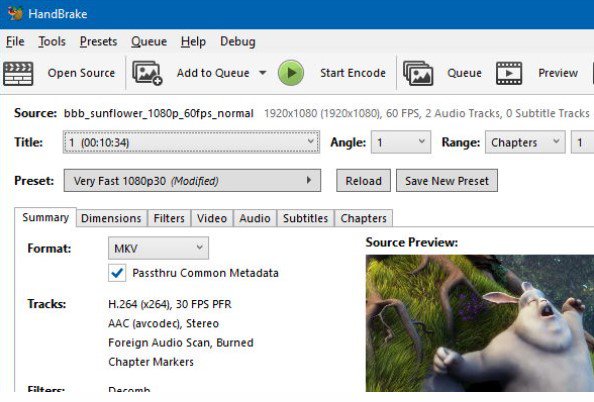
HandBrake ir bezmaksas un atvērtā pirmkoda video failu pārkodētājs, kas paredzēts digitālo video apstrādei un formātu konvertēšanai. Sākotnēji to 2003. klajā laidis Ēriks Petī (Eric Petit), lai atvieglotu DVD disku kopēšanu un saglabāšanu datu nesējos. Programmatūras pamatā ir integrēti daudzi trešo pušu audio un video kodeki un bibliotēkas, piemēram, FFmpeg, x264 un x265, kā arī uzlaboti video deinterlacinga un apstrādes filtri. Tas viss apvienots vienotā, ērti lietojamā saskarnē, ļaujot lietotājiem efektīvi un bez sarežģītām komandrindas utilītām konvertēt video failus starp dažādiem populārākajiem formātiem. Lietojumprogramma piedāvā plašas pielāgošanas iespējas gan iesācējiem, gan pieredzējušiem profesionāļiem. Ar iebūvēto sagatavju (presets) palīdzību lietotāji var ātri sagatavot video atskaņošanai mobilajās ierīcēs, planšetdatoros, televizoros vai tīmekļa vietnēs. Tajā pat laikā detalizētas opcijas ļauj manuāli regulēt bitreitu, kadru nomaiņas ātrumu, audio celiņus, subtitrus un filtrus, nodrošinot pilnīgu kontroli pār izejas faila kvalitāti un izmēru.
Galvenās Funkcijas
Visaptverošs video kodeku atbalsts:Integrē modernus un efektīvus kodētājus, piemēram, H.264, H.265, MPEG-4, VP8/VP9 un AV1 augstas kvalitātes video saspiešanai.
Gatavas ierīču sagataves:Nodrošina plašu optimizētu profilu klāstu ātrai video konvertēšanai konkrētām ierīcēm vai platformām bez manuālas iestatīšanas.
Uzlabota video filtrēšana:Ietver jaudīgus rīkus video izšķirtspējas mērogošanai, deinterlacingam, trokšņu mazināšanai, krāsu korekcijai un kadru ātruma maiņai.
Partiju (Batch) apstrāde:Ļauj vienlaicīgi rindā pievienot un apstrādāt vairākus video failus, ievērojami ietaupot laiku liela apjoma darbos.
Subtitru un audio celiņu pārvaldība:Nodrošina iespēju izvēlēties, pievienot vai iegult vairākus audio celiņus un subtitru failus vienā izvades konteinerā.
How to Install / Run
1
Atveriet iebūvēto programmatūras pārvaldnieku vai lietotņu katalogu savā operētājsistēmā.
2
Meklēšanas joslā ierakstiet 'HandBrake' un atlasiet oficiālo lietotni.
3
Noklikšķiniet uz instalēšanas pogas un pagaidiet, līdz process noslēdzas.
Plusi / Priekšrocības
Pilnīgi bezmaksas un atvērtā pirmkoda programmatūra bez slēptiem maksājumiem vai ūdenszīmēm
Lieliska video kvalitātes un faila izmēra attiecība, pateicoties modernajiem kodekiem
Pieejamas oficiālās versijas visām galvenajām operētājsistēmām (Linux, macOS un Windows)
Plaša lietotāju kopiena un regulāri programmatūras atjauninājumi
Mīnusi / Ierobežojumi
Nav paredzēts video montāžai vai efektu pievienošanai — tas ir stingri pārkodēšanas rīks
Dažu sarežģītu kodeku un augstas izšķirtspējas video apstrāde prasa ievērojamus datora resursus
Iesācējiem plašo uzlaboto iestatīciju klāsts var sākotnēji šķist pārlieku sarežģīts
Описание
HandBrake — это бесплатный транскoдep цифровых видеофайлов с открытым исходным кодом, предназначенный для конвертации видео практически из любых форматов в современные и поддерживаемые кодеки. Программа была первоначально создана в 2003 году Эриком Пети (Eric Petit) для упрощения копирования DVD-дисков на цифровые носители. Бэкенд HandBrake объединяет множество сторонних аудио- и видеобиблиотек, включая такие передовые кодеки, как FFmpeg, x264 и x265, а также компоненты видеофильтрации и деинтерлейсинга. Все они собраны в единый инструмент, избавляющий пользователя от необходимости работать со сложными утилитами командной строки. Программа подходит как для новичков, так и для профессионалов в области видеопроизводства. Благодаря встроенным пресетам пользователи могут за секунды оптимизировать видео для смартфонов, планшетов, телевизоров или веб-платформ. В то же время расширенные настройки позволяют вручную регулировать битрейт, частоту кадров, аудиодорожки и субтитры, обеспечивая полный контроль над качеством и размером выходного файла.
Ключевые Особенности
Поддержка современных кодеков:Кодирование видео в популярные форматы, включая H.264, H.265 (HEVC), VP8, VP9 и AV1 для эффективного сжатия.
Встроенные профили устройств:Набор готовых настроек для быстрой оптимизации видео под мобильные устройства, игровые консоли и веб-сервисы.
Расширенная фильтрация видео:Инструменты для деинтерлейсинга, подавления шумов, обрезки, масштабирования и настройки цветокоррекции.
Очередь пакетной обработки:Возможность ставить в очередь сразу несколько файлов для автоматического последовательного преобразования.
Управление аудио и субтитрами:Поддержка множества звуковых дорожек, функций сквозной передачи звука (passthrough) и добавления субтитров.
How to Install / Run
1
Откройте встроенный центр приложений или менеджер пакетов вашей системы.
2
Найдите 'HandBrake' с помощью строки поиска.
3
Нажмите кнопку установки и дождитесь завершения процесса.
Преимущества (Плюсы)
Полностью бесплатное программное обеспечение с открытым кодом без рекламы и водяных знаков
Высокая степень сжатия и отличное качество готового видео благодаря передовым библиотекам
Кроссплатформенность с нативной поддержкой Linux, macOS и Windows
Регулярные обновления и активная поддержка сообщества разработчиков
Недостатки (Минусы)
Не предназначена для полноценного монтажа видео и наложения визуальных эффектов
Процесс кодирования в высоком разрешении требует значительных вычислительных ресурсов процессора
Множество профессиональных параметров может потребовать времени на освоение новичками
Description
HandBrake is a free and open-source transcoder for digital video files, designed to convert video from nearly any format to a selection of modern, widely supported codecs. Originally developed in 2003 by Eric Petit to simplify ripping DVDs onto data storage devices, HandBrake has evolved into one of the most powerful video conversion tools available. Its backend integrates numerous third-party audio and video libraries, including top-tier codecs like FFmpeg, x264, and x265, alongside sophisticated video filters such as deinterlacers. These components are seamlessly collected into an accessible interface, sparing users from complex command-line workflows. The application caters to both casual users and video professionals. With built-in device presets, users can instantly optimize videos for playback on smartphones, tablets, streaming devices, and computers. Meanwhile, advanced users can dive deep into manual configurations, adjusting resolution, bitrate, framerates, audio tracks, and subtitle management to achieve the exact balance of video fidelity and file size required for their projects.
Key Features
Extensive Codec Support:Encodes video into popular and modern formats including H.264, H.265 (HEVC), MPEG-4, VP8, VP9, and AV1.
Built-in Device Presets:Offers pre-configured optimization profiles tailored for specific devices, web platforms, and standard resolutions.
Advanced Video Filtering:Features robust tools for deinterlacing, decomb, denoising, cropping, scaling, and color space adjustments.
Batch Processing Queue:Enables users to queue multiple video files for sequential conversion, maximizing workflow efficiency.
Audio and Subtitle Control:Supports multiple audio tracks, pass-through options, volume adjustments, and soft/hardcoded subtitle embedding.
How to Install / Run
1
Open your system's built-in software center or package manager.
2
Search for 'HandBrake' in the application directory.
3
Click install and wait for the application to be ready for use.
Advantages (Pros)
100% free and open-source with no trial periods, ads, or watermarks
Exceptional compression efficiency and output video quality using industry-standard libraries
Cross-platform availability with native clients for Linux, macOS, and Windows
Active development and community support ensuring compatibility with new media formats
Disadvantages (Cons)
Focuses strictly on transcoding and does not include timeline-based video editing features
High-end encoding processes (like AV1 or HEVC) can heavily utilize CPU resources
Advanced parameter menus may present a steep learning curve for absolute beginners
Description
HandBrake is a free and open-source transcoder for digital video files, designed to convert video from nearly any format to a selection of modern, widely supported codecs. Originally developed in 2003 by Eric Petit to simplify ripping DVDs onto data storage devices, HandBrake has evolved into one of the most powerful video conversion tools available. Its backend integrates numerous third-party audio and video libraries, including top-tier codecs like FFmpeg, x264, and x265, alongside sophisticated video filters such as deinterlacers. These components are seamlessly collected into an accessible interface, sparing users from complex command-line workflows. The application caters to both casual users and video professionals. With built-in device presets, users can instantly optimize videos for playback on smartphones, tablets, streaming devices, and computers. Meanwhile, advanced users can dive deep into manual configurations, adjusting resolution, bitrate, framerates, audio tracks, and subtitle management to achieve the exact balance of video fidelity and file size required for their projects.
Key Features
Extensive Codec Support:Encodes video into popular and modern formats including H.264, H.265 (HEVC), MPEG-4, VP8, VP9, and AV1.
Built-in Device Presets:Offers pre-configured optimization profiles tailored for specific devices, web platforms, and standard resolutions.
Advanced Video Filtering:Features robust tools for deinterlacing, decomb, denoising, cropping, scaling, and color space adjustments.
Batch Processing Queue:Enables users to queue multiple video files for sequential conversion, maximizing workflow efficiency.
Audio and Subtitle Control:Supports multiple audio tracks, pass-through options, volume adjustments, and soft/hardcoded subtitle embedding.
How to Install / Run
1
Open your system's built-in software center or package manager.
2
Search for 'HandBrake' in the application directory.
3
Click install and wait for the application to be ready for use.
Advantages (Pros)
100% free and open-source with no trial periods, ads, or watermarks
Exceptional compression efficiency and output video quality using industry-standard libraries
Cross-platform availability with native clients for Linux, macOS, and Windows
Active development and community support ensuring compatibility with new media formats
Disadvantages (Cons)
Focuses strictly on transcoding and does not include timeline-based video editing features
High-end encoding processes (like AV1 or HEVC) can heavily utilize CPU resources
Advanced parameter menus may present a steep learning curve for absolute beginners
Description
HandBrake is a free and open-source transcoder for digital video files, designed to convert video from nearly any format to a selection of modern, widely supported codecs. Originally developed in 2003 by Eric Petit to simplify ripping DVDs onto data storage devices, HandBrake has evolved into one of the most powerful video conversion tools available. Its backend integrates numerous third-party audio and video libraries, including top-tier codecs like FFmpeg, x264, and x265, alongside sophisticated video filters such as deinterlacers. These components are seamlessly collected into an accessible interface, sparing users from complex command-line workflows. The application caters to both casual users and video professionals. With built-in device presets, users can instantly optimize videos for playback on smartphones, tablets, streaming devices, and computers. Meanwhile, advanced users can dive deep into manual configurations, adjusting resolution, bitrate, framerates, audio tracks, and subtitle management to achieve the exact balance of video fidelity and file size required for their projects.
Key Features
Extensive Codec Support:Encodes video into popular and modern formats including H.264, H.265 (HEVC), MPEG-4, VP8, VP9, and AV1.
Built-in Device Presets:Offers pre-configured optimization profiles tailored for specific devices, web platforms, and standard resolutions.
Advanced Video Filtering:Features robust tools for deinterlacing, decomb, denoising, cropping, scaling, and color space adjustments.
Batch Processing Queue:Enables users to queue multiple video files for sequential conversion, maximizing workflow efficiency.
Audio and Subtitle Control:Supports multiple audio tracks, pass-through options, volume adjustments, and soft/hardcoded subtitle embedding.
How to Install / Run
1
Open your system's built-in software center or package manager.
2
Search for 'HandBrake' in the application directory.
3
Click install and wait for the application to be ready for use.
Advantages (Pros)
100% free and open-source with no trial periods, ads, or watermarks
Exceptional compression efficiency and output video quality using industry-standard libraries
Cross-platform availability with native clients for Linux, macOS, and Windows
Active development and community support ensuring compatibility with new media formats
Disadvantages (Cons)
Focuses strictly on transcoding and does not include timeline-based video editing features
High-end encoding processes (like AV1 or HEVC) can heavily utilize CPU resources
Advanced parameter menus may present a steep learning curve for absolute beginners
LICENSE PERMISSIONS & LEGAL REFERENCE
Public Distribution Permission:OFFICIALLY PERMITTED TO REDISTRIBUTE (100% Legal Release)
(Guaranteed rights to freely download, copy, and share in unmodified form under open-source / freeware terms).
License Model & Status:GNU General Public License v2.0 only.
Official Distribution Permission:Under the official HandBrake license (GPL-2.0-only), this software is free and permits unrestricted downloading and distribution.