
Title
Attention Anonymous User!Your download speed is severely restricted. Registered users download at full speed without waiting. Register now!

BleachBit v. 6.0.4
PC Cleaning & Optimizationv. 6.0.4

Original Descriptions
🇱🇻Latvian
🇷🇺Russian
🇬🇧English
Instant Translation
🇩🇪Deutsch
🇪🇸Español
🇫🇷Français
🇪🇪Eesti
🇱🇹Lietuvių
🇵🇱Polski
🇺🇦Українська
🇮🇹Italiano
🇵🇹Português
🇫🇮Suomi
🇸🇪Svenska
🇳🇴Norsk
🇨🇳中文
🇯🇵日本語
Operating System
Windows
11108/8.17
Architecture
64-bit (x64)
Apraksts
BleachBit ir bezmaksas un atvērtā pirmkoda diska vietas tīrītājs, privātuma pārvaldnieks un datora sistēmas optimizētājs, ko izstrādājis Endrjū Zīms (Andrew Ziem). Programmatūra palīdz lietotājiem atbrīvot vērtīgu diska vietu, izdzēšot nevajadzīgos failus, pagaidu datus, kešatmiņu un pārlūkprogrammas vēsturi, vienlaikus aizsargājot privātumu, droši iznīcinot sensitīvus datus un novēršot to atjaunošanu. Tā piedāvā jaudīgus rīkus failu šifrēšanai, sistēmas sakopšanai un atjaunināto pakotņu pārpalikumu dzēšanai gan Windows, gan Linux operētājsistēmās.
Pateicoties tās modulārajai struktūrai, BleachBit atbalsta simtiem populāru lietojumprogrammu, tostarp Firefox, Google Chrome, Adobe Reader un VLC, ļaujot precīzi izvēlēties tīrāmos elementus, izmantojot gan vienkāršu grafisko saskarni (GUI), gan komandrindu automatizētiem uzdevumiem. Tas padara rīku ideāli piemērotu gan ikdienas mājas lietotājiem, kuri vēlas uzturēt sistēmas ātrumu, gan sistēmas administratori, kuri pārvalda vairākus datorus un vēlas nodrošināt optimālu veiktspēju un datu drošību.
Galvenās Funkcijas
- Diska vietas atbrīvošana: Efektīvi atrod un izdzēš nevajadzīgos pagaidu failus, sistēmas žurnālus un instalācijas pakotņu atlikumus, atgūstot gigabaitus brīvas vietas.
- Privātuma aizsardzība: Droši dzēš pārlūkprogrammas vēsturi, sīkfailus (cookies), kešatmiņu un sesiju datus no populārākajām tīmekļa pārlūkprogrammām un lietotnēm.
- Droša failu iznīcināšana: Pārraksta sensitīvus failus vairākas reizes, lai padarītu tos neatgūstamus pat ar uzlabotām datu atkopšanas programmām.
- Sistēmas optimizācija: Veic dziļu sistēmas sakopšanu, optimizējot reģistru un failu struktūras, lai uzlabotu vispārējo datora darbības ātrumu.
- Komandrindas atbalsts: Nodrošina pilnu automatizācijas iespēju caur komandrindu skriptu un regulāru fona uzturēšanas uzdevumu izpildei.
How to Install / Run
- 1Atveriet lietojumprogrammu pārvaldnieku vai sistēmas iestatījumus.
- 2Atrodiet BleachBit un izvēlieties instalēšanas opciju.
- 3Pēc instalēšanas palaidiet programmu no lietotņu izvēlnes, lai sāktu sistēmas tīrīšanu.
Plusi / Priekšrocības
- Bezmaksas un pilnībā atvērtā pirmkoda programmatūra bez slēptām maksām vai reklāmām.
- Ļoti viegls un ātrs, patērējot minimālus sistēmas resursus darbības laikā.
- Plaša lietojumprogrammu saderība, atbalstot simtiem trešo pušu programmu.
- Iespēja droši un neatgriezeniski dzēst sensitīvus datus.
Mīnusi / Ierobežojumi
- Nepareizi konfigurēti iestatījumi vai pārmērīga tīrīšana var izraisīt datu zudumu vai programmu nestabilitāti.
- Grafiskā saskarne ir vienkārša un var šķist nedaudz novecojusi salīdzinājumā ar moderniem komerciāliem optimizētājiem.
Описание
BleachBit — это бесплатная программа с открытым исходным кодом для очистки дискового пространства, управления конфиденциальностью и оптимизации работы компьютера, созданная Эндрю Зимом (Andrew Ziem). ПО помогает пользователям освобождать ценное дисковое пространство путем удаления ненужных файлов, временных данных, кэша и истории браузеров, одновременно защищая конфиденциальность за счет безопасного уничтожения чувствительных данных и предотвращения их восстановления. Программа предлагает мощные инструменты для безвозвратного удаления файлов, очистки системы и удаления устаревших обновлений как в операционных системах Windows, так и в Linux.
Благодаря модульной архитектуре BleachBit поддерживает сотни популярных приложений, включая Firefox, Google Chrome, Adobe Reader и VLC, обеспечивая точный контроль над очисткой с помощью как простого графического интерфейса (GUI), так и командной строки для автоматизации задач. Это делает инструмент идеальным выбором как для обычных пользователей, желающих поддерживать высокую скорость работы ПК, так и для системных администраторов, управляющих множеством устройств и обеспечивающих их производительность и безопасность.
Ключевые Особенности
- Освобождение места на диске: Эффективно находит и удаляет ненужные временные файлы, системные логи и остатки инсталляционных пакетов, возвращая гигабайты памяти.
- Защита конфиденциальности: Надежно удаляет историю браузеров, файлы cookie, кэш и данные сеансов из популярных веб-обозревателей и программ.
- Безопасное измельчение файлов: Перезаписывает конфиденциальные файлы несколько раз, делая их абсолютно невосстановимыми даже с помощью специализированного ПО.
- Системная оптимизация: Выполняет глубокую очистку системы для ускорения работы компьютера и устранения накопленного цифрового мусора.
- Поддержка командной строки: Предоставляет полный набор функций для автоматизации через скрипты и настройки регулярных фоновых задач.
How to Install / Run
- 1Откройте менеджер пакетов или центр приложений вашей системы.
- 2Найдите BleachBit и выберите опцию установки.
- 3Запустите BleachBit из меню приложений после завершения установки, чтобы начать очистку.
Преимущества (Плюсы)
- Бесплатная программа с открытым исходным кодом без скрытых платежей, подписок и рекламы.
- Легковесный и быстрый инструмент с минимальным потреблением системных ресурсов.
- Широкая поддержка сторонних приложений и программных экосистем.
- Продвинутые функции безопасного удаления данных для максимальной конфиденциальности.
Недостатки (Минусы)
- Неправильно настроенная очистка может привести к удалению пользовательских настроек или сбоям в работе некоторых приложений.
- Аскетичный интерфейс может показаться слишком простым по сравнению с коммерческими аналогами.
Description
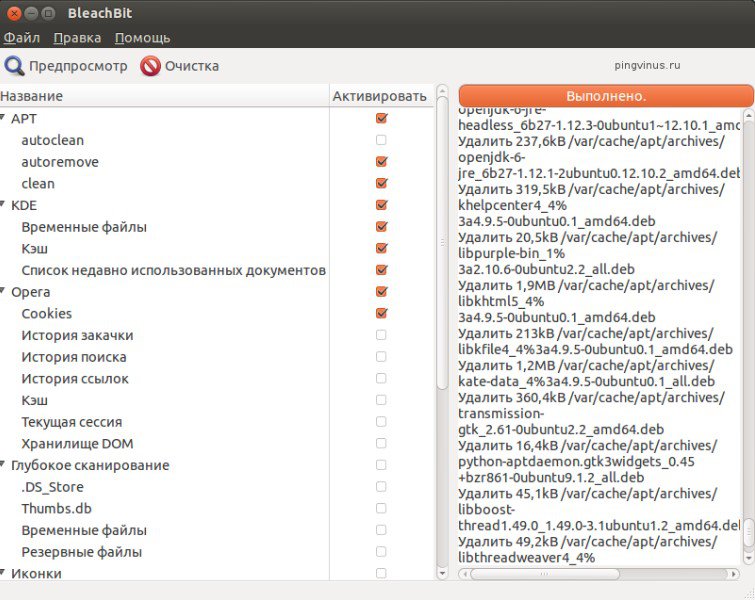
BleachBit is a free and open-source disk space cleaner, privacy manager, and computer system optimizer created by Andrew Ziem. The software helps users free up valuable disk space by deleting unnecessary files, temporary data, caches, and browser history, while simultaneously protecting their privacy by securely shredding sensitive data to prevent recovery. It provides powerful tools for file wiping, system cleanup, and removing leftover update packages across both Windows and Linux operating systems.
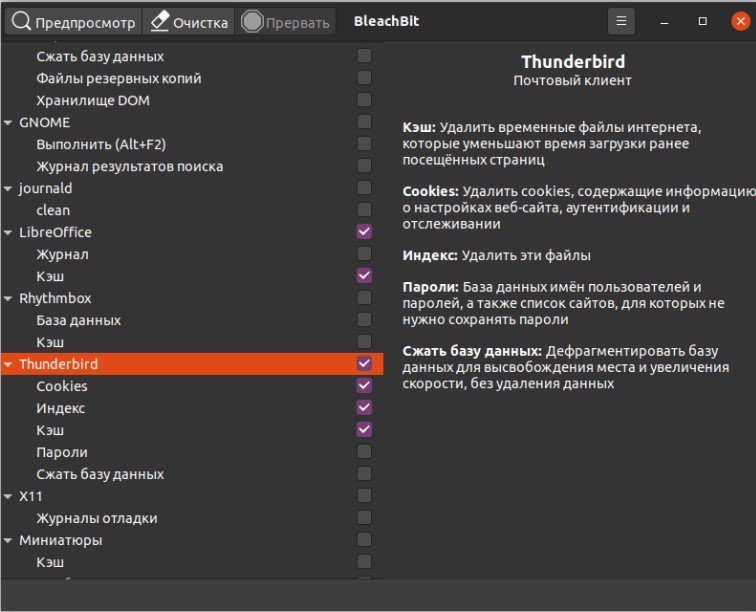
Thanks to its modular architecture, BleachBit supports hundreds of popular applications including Firefox, Google Chrome, Adobe Reader, and VLC, allowing precise control over what gets cleaned via both a clean graphical user interface (GUI) and a command-line interface for automated tasks. This makes the tool ideal for both everyday home users looking to maintain system speed and system administrators managing multiple machines to ensure optimal performance and data security.
Key Features
- Disk Space Recovery: Efficiently identifies and deletes unnecessary temporary files, system logs, and installation package remnants to reclaim gigabytes of storage.
- Privacy Protection: Securely wipes browser history, cookies, cache, and session data from popular web browsers and applications to prevent tracking.
- Secure File Shredding: Overwrites sensitive files multiple times to render them completely unrecoverable even with advanced data recovery software.
- System Optimization: Performs deep system maintenance by cleaning caches and temporary data structures to improve overall computer responsiveness.
- Command-Line Support: Offers full CLI integration for automation through scripts and scheduling regular background maintenance tasks.
How to Install / Run
- 1Open your system's package manager or software center.
- 2Search for BleachBit and select the installation option.
- 3Launch BleachBit from your application menu once installed to begin managing system cleanliness.
Advantages (Pros)
- Free and open-source software with no hidden costs, trial limits, or advertisements.
- Lightweight and fast with minimal system resource consumption during execution.
- Extensive application support covering hundreds of third-party programs.
- Advanced file shredding capabilities for robust data privacy.
Disadvantages (Cons)
- Aggressive or misconfigured cleaning settings can occasionally lead to lost preferences or program instability.
- The user interface is utilitarian and minimal compared to commercial system optimizers.
Description
BleachBit is a free and open-source disk space cleaner, privacy manager, and computer system optimizer created by Andrew Ziem. The software helps users free up valuable disk space by deleting unnecessary files, temporary data, caches, and browser history, while simultaneously protecting their privacy by securely shredding sensitive data to prevent recovery. It provides powerful tools for file wiping, system cleanup, and removing leftover update packages across both Windows and Linux operating systems.
Thanks to its modular architecture, BleachBit supports hundreds of popular applications including Firefox, Google Chrome, Adobe Reader, and VLC, allowing precise control over what gets cleaned via both a clean graphical user interface (GUI) and a command-line interface for automated tasks. This makes the tool ideal for both everyday home users looking to maintain system speed and system administrators managing multiple machines to ensure optimal performance and data security.
Key Features
- Disk Space Recovery: Efficiently identifies and deletes unnecessary temporary files, system logs, and installation package remnants to reclaim gigabytes of storage.
- Privacy Protection: Securely wipes browser history, cookies, cache, and session data from popular web browsers and applications to prevent tracking.
- Secure File Shredding: Overwrites sensitive files multiple times to render them completely unrecoverable even with advanced data recovery software.
- System Optimization: Performs deep system maintenance by cleaning caches and temporary data structures to improve overall computer responsiveness.
- Command-Line Support: Offers full CLI integration for automation through scripts and scheduling regular background maintenance tasks.
How to Install / Run
- 1Open your system's package manager or software center.
- 2Search for BleachBit and select the installation option.
- 3Launch BleachBit from your application menu once installed to begin managing system cleanliness.
Advantages (Pros)
- Free and open-source software with no hidden costs, trial limits, or advertisements.
- Lightweight and fast with minimal system resource consumption during execution.
- Extensive application support covering hundreds of third-party programs.
- Advanced file shredding capabilities for robust data privacy.
Disadvantages (Cons)
- Aggressive or misconfigured cleaning settings can occasionally lead to lost preferences or program instability.
- The user interface is utilitarian and minimal compared to commercial system optimizers.
Description
BleachBit is a free and open-source disk space cleaner, privacy manager, and computer system optimizer created by Andrew Ziem. The software helps users free up valuable disk space by deleting unnecessary files, temporary data, caches, and browser history, while simultaneously protecting their privacy by securely shredding sensitive data to prevent recovery. It provides powerful tools for file wiping, system cleanup, and removing leftover update packages across both Windows and Linux operating systems.
Thanks to its modular architecture, BleachBit supports hundreds of popular applications including Firefox, Google Chrome, Adobe Reader, and VLC, allowing precise control over what gets cleaned via both a clean graphical user interface (GUI) and a command-line interface for automated tasks. This makes the tool ideal for both everyday home users looking to maintain system speed and system administrators managing multiple machines to ensure optimal performance and data security.
Key Features
- Disk Space Recovery: Efficiently identifies and deletes unnecessary temporary files, system logs, and installation package remnants to reclaim gigabytes of storage.
- Privacy Protection: Securely wipes browser history, cookies, cache, and session data from popular web browsers and applications to prevent tracking.
- Secure File Shredding: Overwrites sensitive files multiple times to render them completely unrecoverable even with advanced data recovery software.
- System Optimization: Performs deep system maintenance by cleaning caches and temporary data structures to improve overall computer responsiveness.
- Command-Line Support: Offers full CLI integration for automation through scripts and scheduling regular background maintenance tasks.
How to Install / Run
- 1Open your system's package manager or software center.
- 2Search for BleachBit and select the installation option.
- 3Launch BleachBit from your application menu once installed to begin managing system cleanliness.
Advantages (Pros)
- Free and open-source software with no hidden costs, trial limits, or advertisements.
- Lightweight and fast with minimal system resource consumption during execution.
- Extensive application support covering hundreds of third-party programs.
- Advanced file shredding capabilities for robust data privacy.
Disadvantages (Cons)
- Aggressive or misconfigured cleaning settings can occasionally lead to lost preferences or program instability.
- The user interface is utilitarian and minimal compared to commercial system optimizers.
LICENSE PERMISSIONS & LEGAL REFERENCE
- Public Distribution Permission: OFFICIALLY PERMITTED TO REDISTRIBUTE (100% Legal Release)
(Guaranteed rights to freely download, copy, and share in unmodified form under open-source / freeware terms). - License Model & Status: GNU General Public License version 3.
- Official Distribution Permission: Under the official BleachBit license (GPLv3), this software is free and permits unrestricted downloading and distribution.
- Official Project Homepage: https://www.bleachbit.org.
- Exact License & Terms Link: https://www.gnu.org/licenses/gpl-3.0.html.
- Official License Registry (Alternative Legal Source): https://www.gnu.org/licenses/gpl-3.0.html.
Images
Similar / Other Versions
No similar torrents found.
Technical Specifications
- DeveloperAndrew Ziem
- Release Date08.09.2026
- Operating SystemWindows11108/8.17
- Architecture64-bit (x64)
- Release FormatSetup / Installer Portable
- Languages🌍🇱🇻🇷🇺🇬🇧🇺🇦🇩🇪🇫🇷
- Official Homepagebleachbit.org
- filesView (1)
System Requirements
- Processor (CPU)1 GHz 64-bit x86 processor
- Memory (RAM)512 MB
- Free Disk Space50 MB
- Graphics Card (GPU)Standard display (No dedicated GPU required)
Rating
None
Said thanks
📢 Advertisement[+]
VPNMost people overpay for a VPN without realising it. CometVPN starts from just $1.89/month — same privacy, same security, same speeds as the big names. Just without the big price tag.Want to be seen by everyone?Place your ad here using your site balance! The perfect spot to promote your releases, clan, or links.Your text ad here!Grab this spot using your accumulated balance and get noticed.
+ Add your advertisement
📂 files (1)
×
| Path | Size |
|---|---|
| BleachBit-6.0.4-setup.exe | 16.37 MB |
❮
×
![]()
❯
Share on Facebook
Choose the image you want to see in your Facebook post:
Choose which image you want to see in your Facebook post and click "Share this image":
 Screenshot 1
 Screenshot 2
 Screenshot 3
 Screenshot 4
Facebook will automatically load the selected image in your post preview!
Facebook will automatically load the chosen image in the post preview.
🌐 All Supported Languages 45
🇬🇧
English
EN
🇸🇦
Arabic
العربية
AR
🇪🇸
Asturian
AST
🇧🇾
Belarusian
Беларуская
BE
🇧🇬
Bulgarian
Български
BG
🇪🇸
Catalan
Català
CA
🇨🇳
Chinese (Simplified)
简体中文
ZH-CN
🇹🇼
Chinese (Traditional)
繁體中文
ZH-TW
🇭🇷
Croatian
Hrvatski
HR
🇨🇿
Czech
Čeština
CS
🇩🇰
Danish
Dansk
DA
🇳🇱
Dutch
Nederlands
NL
🟢
Esperanto
EO
🇪🇪
Estonian
Eesti
ET
🇫🇮
Finnish
Suomi
FI
🇫🇷
French
Français
FR
🇪🇸
Galician
Galego
GL
🇬🇪
Georgian
ქართული
KA
🇩🇪
German
Deutsch
DE
🇬🇷
Greek
Ελληνικά
EL
🇮🇱
Hebrew
עברית
HE
🇭🇺
Hungarian
Magyar
HU
🇮🇩
Indonesian
Bahasa Indonesia
ID
🇮🇹
Italian
Italiano
IT
🇯🇵
Japanese
日本語
JA
🇰🇷
Korean
한국어
KO
🇱🇻
Latvian
Latviešu
LV
🇱🇹
Lithuanian
Lietuvių
LT
🇲🇾
Malay
Bahasa Melayu
MS
🇳🇴
Norwegian
Norsk
NO
🇵🇱
Polish
Polski
PL
🇧🇷
Portuguese (Brazil)
Português (Brasil)
PT-BR
🇵🇹
Portuguese
Português
PT
🇷🇴
Romanian
Română
RO
🇷🇺
Russian
Русский
RU
🇷🇸
Serbian
Српски
SR
🇸🇰
Slovak
Slovenčina
SK
🇸🇮
Slovenian
Slovenščina
SL
🇪🇸
Spanish
Español
ES
🇸🇪
Swedish
Svenska
SV
🇮🇳
Tamil
தமிழ்
TA
🇹🇭
Thai
ไทย
TH
🇹🇷
Turkish
Türkçe
TR
🇺🇦
Ukrainian
Українська
UK
🇻🇳
Vietnamese
Tiếng Việt
VI
No matching languages found
Total supported languages: 45