
Title
Attention Anonymous User!Your download speed is severely restricted. Registered users download at full speed without waiting. Register now!
FreeCad v. 1.1.3
Photo & Designv. 1.1.3

Original Descriptions
🇱🇻Latvian
🇷🇺Russian
🇬🇧English
Instant Translation
🇩🇪Deutsch
🇪🇸Español
🇫🇷Français
🇪🇪Eesti
🇱🇹Lietuvių
🇵🇱Polski
🇺🇦Українська
🇮🇹Italiano
🇵🇹Português
🇫🇮Suomi
🇸🇪Svenska
🇳🇴Norsk
🇨🇳中文
🇯🇵日本語
Operating System
Windows
1110
Architecture
64-bit (x64)
Apraksts
FreeCAD ir vispārējas nozīmes parametrisks 3D datorizētās projektēšanas (CAD) modelētājs un ēku informācijas modelēšanas (BIM) programmatūras lietotne ar galīgo elementu metodes (FEM) atbalstu. Tā galvenokārt ir paredzēta mehānikas inženierijas produktu dizainam, taču tā paplašinās arī uz plašāku inženierzinātņu lietojumu klāstu, piemēram, arhitektūru vai elektrotehniku. Programmatūra izmanto parametrisku lädu modeli, kas ļauj viegli modificēt savu dizainu, atgriežoties modelēšanas vēsturē un mainot tā parametrus. Pateicoties atvērtā pirmkoda dabai, FreeCAD nodrošina lietotājiem pilnīgu brīvību paplašināt tā funkcionalitāti, izmantojot Python programmēšanas valodu. Tas ietver dažādas darba vides (Workbench), kas pielāgotas konkrētiem uzdevumiem, piemēram, rasējumu ģenerēšanai, 3D renderēšanai vai simulācijām. Rīks ir lieliski piemērots gan profesionāliem inženieriem, gan hobiju entuziastiem, kuri meklē spēcīgu un bezmaksas alternatīvu komerciālajām CAD sistēmām.
Galvenās Funkcijas
- Parametriska 3D modelēšana: Ļauj viegli modificēt izveidotos objektus, mainot to parametrus vēstures kokā.
- BIM un arhitektūras rīki: Nodrošina pilnu atbalstu ēku informācijas modelēšanai un arhitektoniskai projektēšanai.
- Galīgo elementu metode (FEM): Ietver iebūvētos analīzes rīkus materiālu sprieguma un konstrukciju noturības testēšanai.
- Python paplašināmība: Sniedz iespēju rakstīt skriptus un veidot savus moduļus vai pielāgotus rīkus.
- Multiplatformu atbalsts: Lieliski darbojas operētājsistēmās Linux, macOS un Windows ar vienotu saskarni.
How to Install / Run
- 1Pārliecinieties, ka jūsu sistēmā ir pieejami atbilstoši grafiskie draiveri un sistēmas atjauninājumi.
- 2Atveriet lietotņu pārvaldnieku vai programmatūras katalogu savā operētājsistēmā.
- 3Atrodiet FreeCAD un izpildiet instalēšanas soli, lai pabeigtu iestatīšanu.
Plusi / Priekšrocības
- Pilnīgi bezmaksas un atvērtā pirmkoda programmatūra
- Plaša darba vidu daudzveidība dažādām inženierijas nozarēm
- Spēcīga Python skriptēšanas un automatizācijas integrācija
- Aktīva un atsaucīga globālā lietotāju kopiena
Mīnusi / Ierobežojumi
- Stāva mācīšanās līkne iesācējiem, kas nav pazīstami ar CAD
- Saskarne var šķist mazāk intuitīva salīdzinājumā ar dārgām komerciālajām alternatīvām
Описание
FreeCAD — это универсальный параметрический 3D-моделировщик для систем автоматизированного проектирования (САПР/CAD), а также приложение для информационного моделирования зданий (BIM) с поддержкой метода конечных элементов (МКЭ). Программа предназначена главным образом для проектирования изделий в области машиностроения, но также находит широкое применение в архитектуре, электротехнике и других инженерных дисциплинах. Использование параметрической истории позволяет легко изменять геометрические формы и параметры объектов на любом этапе работы. Будучи свободным программным обеспечением с открытым исходным кодом, FreeCAD предоставляет пользователям возможность гибко расширять функциональность с помощью языка программирования Python. Модульная архитектура включает специализированные рабочие среды (верстаки) для решения конкретных задач — от создания сложных механических сборок до генерации чертежей и проведения инженерных расчетов. Это отличная альтернатива коммерческим САПР для инженеров, архитекторов и энтузиастов.
Ключевые Особенности
- Параметрическое 3D-моделирование: Позволяет строить точные трехмерные объекты с историей построений для гибкого изменения параметров.
- Инструменты BIM и архитектуры: Специализированные рабочие среды для проектирования зданий, конструкций и планов этажей.
- Метод конечных элементов (FEM): Встроенные средства для проведения инженерного анализа прочности, напряжений и деформаций.
- Поддержка скриптов Python: Полный программный доступ для автоматизации задач, написания макросов и создания собственных инструментов.
- Кроссплатформенность: Стабильная и полноценная работа в операционных системах Linux, macOS и Windows.
How to Install / Run
- 1Убедитесь, что ваша система соответствует требованиям для работы с трехмерной графикой.
- 2Откройте менеджер приложений или центр программного обеспечения в вашей операционной системе.
- 3Найдите FreeCAD и запустите процесс установки.
Преимущества (Плюсы)
- Полностью бесплатное ПО с открытым исходным кодом без скрытых платежей
- Модульная структура со специализированными верстаками для разных задач
- Продвинутый движок параметрического моделирования на основе истории
- Широкие возможности автоматизации за счет интеграции с Python
Недостатки (Минусы)
- Довольно крутой порог вхождения для новичков в сфере CAD
- Интерфейс и документация в некоторых продвинутых модулях могут быть сложны в освоении
Description
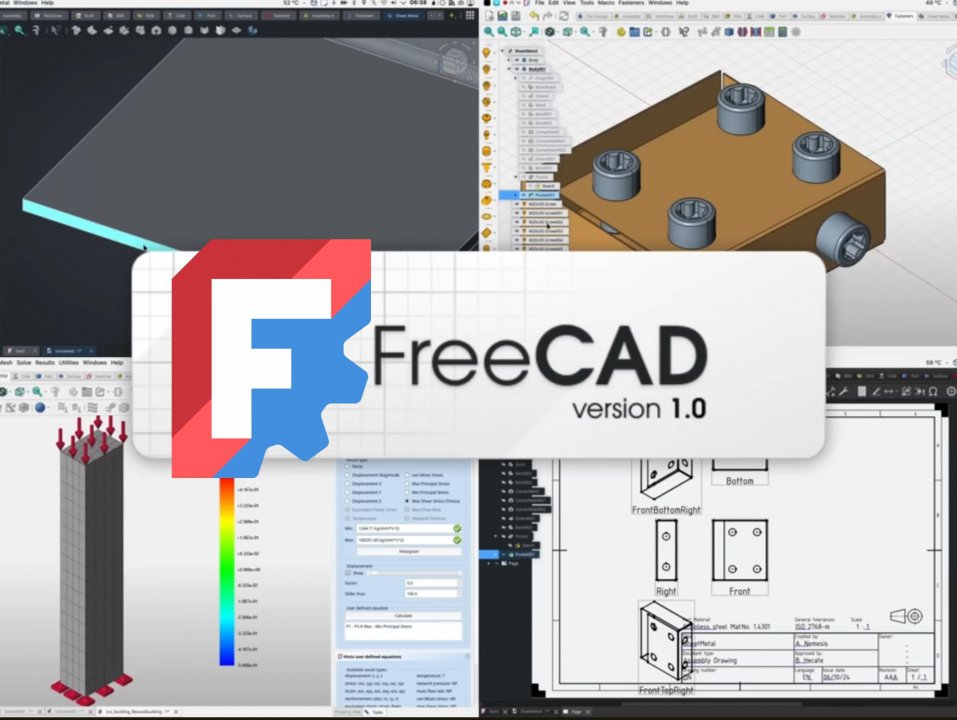
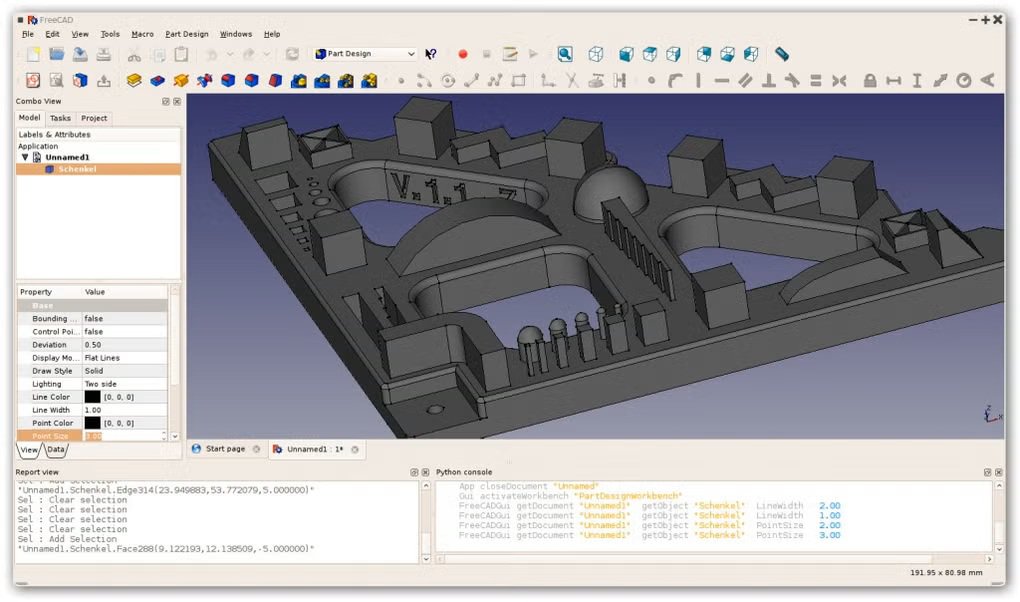
FreeCAD is a general-purpose parametric 3D computer-aided design (CAD) modeler and a building information modeling (BIM) software application with finite element method (FEM) support. It is primarily intended for mechanical engineering product design, but it also expands to a wider range of uses around engineering, such as architecture or electrical engineering. FreeCAD allows you to easily modify your designs by going back into your model history and changing its parameters, making it an exceptional tool for iterative design processes. Being free and open-source, FreeCAD empowers users to extend its rich functionality using the Python programming language and a modular architecture consisting of various dedicated workbenches. Whether you are creating complex mechanical assemblies, architectural floor plans, or running structural finite element analyses, FreeCAD provides a robust, professional-grade environment for makers, engineers, and students alike.
Key Features
- Parametric 3D Modeling: Enables precise creation of 3D models with history trees allowing easy modification of parameters.
- Building Information Modeling (BIM): Offers specialised architectural and structural workbenches for modern construction projects.
- Finite Element Analysis (FEM): Integrated calculation tools to perform structural testing, stress analysis, and thermal simulations.
- Python Scripting Integration: Complete programmatic control allowing macro recording, custom tool creation, and automation.
- Multi-Platform Compatibility: Fully functional and natively optimized across Linux, macOS, and Windows operating systems.
How to Install / Run
- 1Ensure your system meets the standard hardware and graphics requirements.
- 2Open your system's application manager or software center.
- 3Search for FreeCAD and initiate the installation process.
Advantages (Pros)
- Completely free and open-source with no licensing costs
- Extensible modular architecture with specialised workbenches
- Powerful parametric history-based modeling engine
- Robust Python integration for advanced automation
Disadvantages (Cons)
- Steep learning curve for users new to parametric CAD systems
- Documentation can sometimes be technical or fragmented for complex workflows
Description
FreeCAD is a general-purpose parametric 3D computer-aided design (CAD) modeler and a building information modeling (BIM) software application with finite element method (FEM) support. It is primarily intended for mechanical engineering product design, but it also expands to a wider range of uses around engineering, such as architecture or electrical engineering. FreeCAD allows you to easily modify your designs by going back into your model history and changing its parameters, making it an exceptional tool for iterative design processes. Being free and open-source, FreeCAD empowers users to extend its rich functionality using the Python programming language and a modular architecture consisting of various dedicated workbenches. Whether you are creating complex mechanical assemblies, architectural floor plans, or running structural finite element analyses, FreeCAD provides a robust, professional-grade environment for makers, engineers, and students alike.
Key Features
- Parametric 3D Modeling: Enables precise creation of 3D models with history trees allowing easy modification of parameters.
- Building Information Modeling (BIM): Offers specialised architectural and structural workbenches for modern construction projects.
- Finite Element Analysis (FEM): Integrated calculation tools to perform structural testing, stress analysis, and thermal simulations.
- Python Scripting Integration: Complete programmatic control allowing macro recording, custom tool creation, and automation.
- Multi-Platform Compatibility: Fully functional and natively optimized across Linux, macOS, and Windows operating systems.
How to Install / Run
- 1Ensure your system meets the standard hardware and graphics requirements.
- 2Open your system's application manager or software center.
- 3Search for FreeCAD and initiate the installation process.
Advantages (Pros)
- Completely free and open-source with no licensing costs
- Extensible modular architecture with specialised workbenches
- Powerful parametric history-based modeling engine
- Robust Python integration for advanced automation
Disadvantages (Cons)
- Steep learning curve for users new to parametric CAD systems
- Documentation can sometimes be technical or fragmented for complex workflows
Description
FreeCAD is a general-purpose parametric 3D computer-aided design (CAD) modeler and a building information modeling (BIM) software application with finite element method (FEM) support. It is primarily intended for mechanical engineering product design, but it also expands to a wider range of uses around engineering, such as architecture or electrical engineering. FreeCAD allows you to easily modify your designs by going back into your model history and changing its parameters, making it an exceptional tool for iterative design processes. Being free and open-source, FreeCAD empowers users to extend its rich functionality using the Python programming language and a modular architecture consisting of various dedicated workbenches. Whether you are creating complex mechanical assemblies, architectural floor plans, or running structural finite element analyses, FreeCAD provides a robust, professional-grade environment for makers, engineers, and students alike.
Key Features
- Parametric 3D Modeling: Enables precise creation of 3D models with history trees allowing easy modification of parameters.
- Building Information Modeling (BIM): Offers specialised architectural and structural workbenches for modern construction projects.
- Finite Element Analysis (FEM): Integrated calculation tools to perform structural testing, stress analysis, and thermal simulations.
- Python Scripting Integration: Complete programmatic control allowing macro recording, custom tool creation, and automation.
- Multi-Platform Compatibility: Fully functional and natively optimized across Linux, macOS, and Windows operating systems.
How to Install / Run
- 1Ensure your system meets the standard hardware and graphics requirements.
- 2Open your system's application manager or software center.
- 3Search for FreeCAD and initiate the installation process.
Advantages (Pros)
- Completely free and open-source with no licensing costs
- Extensible modular architecture with specialised workbenches
- Powerful parametric history-based modeling engine
- Robust Python integration for advanced automation
Disadvantages (Cons)
- Steep learning curve for users new to parametric CAD systems
- Documentation can sometimes be technical or fragmented for complex workflows
LICENSE PERMISSIONS & LEGAL REFERENCE
- Public Distribution Permission: OFFICIALLY PERMITTED TO REDISTRIBUTE (100% Legal Release)
(Guaranteed rights to freely download, copy, and share in unmodified form under open-source / freeware terms). - License Model & Status: GNU Lesser General Public License v2.1 or later.
- Official Distribution Permission: Under the official FreeCad license (LGPL-2.1-or-later), this software is free and permits unrestricted downloading and distribution.
- Official Project Homepage: https://www.freecad.org.
- Exact License & Terms Link: https://www.gnu.org/licenses/lgpl-2.1.html.
- Official License Registry (Alternative Legal Source): https://opensource.org/licenses/LGPL-2.1.
Images
Similar / Other Versions
No similar torrents found.
Technical Specifications
- DeveloperFreeCAD Community
- Release Date25.07.2026
- Operating SystemWindows1110
- Architecture64-bit (x64)
- Release FormatSetup / Installer Portable
- Languages🌍🇷🇺🇬🇧🇺🇦🇩🇪🇫🇷🇪🇸
- Official Homepagefreecad.org
- filesView (1)
System Requirements
- Processor (CPU)2 GHz 64-bit x86 or ARM processor
- Memory (RAM)4 GB
- Free Disk Space2 GB
- Graphics Card (GPU)Standard display (No dedicated GPU required)
Rating
None
Said thanks
📢 Advertisement[+]
Want to be seen by everyone?Place your ad here using your site balance! The perfect spot to promote your releases, clan, or links.Your text ad here!Grab this spot using your accumulated balance and get noticed.VPNMost people overpay for a VPN without realising it. CometVPN starts from just $1.89/month — same privacy, same security, same speeds as the big names. Just without the big price tag.
+ Add your advertisement
📂 files (1)
×
| Path | Size |
|---|---|
| FreeCAD_1.1.3-Windows-x86_64-py311-installer | 495.23 MB |
❮
×
![]()
❯
Share on Facebook
Choose the image you want to see in your Facebook post:
Choose which image you want to see in your Facebook post and click "Share this image":
 Screenshot 1
 Screenshot 2
 Screenshot 3
Facebook will automatically load the selected image in your post preview!
Facebook will automatically load the chosen image in the post preview.
🌐 All Supported Languages 42
🇬🇧
English
EN
🇿🇦
Afrikaans
AF
🇸🇦
Arabic
العربية
AR
🇪🇸
Basque
Euskara
EU
🇧🇾
Belarusian
Беларуская
BE
🇧🇬
Bulgarian
Български
BG
🇪🇸
Catalan
Català
CA
🇨🇳
Chinese (Simplified)
简体中文
ZH-CN
🇹🇼
Chinese (Traditional)
繁體中文
ZH-TW
🇭🇷
Croatian
Hrvatski
HR
🇨🇿
Czech
Čeština
CS
🇩🇰
Danish
Dansk
DA
🇳🇱
Dutch
Nederlands
NL
🇫🇮
Finnish
Suomi
FI
🇫🇷
French
Français
FR
🇪🇸
Galician
Galego
GL
🇬🇪
Georgian
ქართული
KA
🇩🇪
German
Deutsch
DE
🇬🇷
Greek
Ελληνικά
EL
🇮🇱
Hebrew
עברית
HE
🇮🇳
Hindi
हिन्दी
HI
🇭🇺
Hungarian
Magyar
HU
🇮🇩
Indonesian
Bahasa Indonesia
ID
🇮🇹
Italian
Italiano
IT
🇯🇵
Japanese
日本語
JA
🇰🇷
Korean
한국어
KO
🇱🇹
Lithuanian
Lietuvių
LT
🇳🇴
Norwegian
Norsk
NO
🇵🇱
Polish
Polski
PL
🇧🇷
Portuguese (Brazil)
Português (Brasil)
PT-BR
🇵🇹
Portuguese
Português
PT
🇷🇴
Romanian
Română
RO
🇷🇺
Russian
Русский
RU
🇷🇸
Serbian
Srpski
SR
🇸🇰
Slovak
Slovenčina
SK
🇸🇮
Slovenian
Slovenščina
SL
🇪🇸
Spanish
Español
ES
🇸🇪
Swedish
Svenska
SV
🇹🇷
Turkish
Türkçe
TR
🇺🇦
Ukrainian
Українська
UK
🇻🇳
Vietnamese
Tiếng Việt
VI
🇮🇷
Persian
فارسی
FA
No matching languages found
Total supported languages: 42