WinSCP ir populārs, jaudīgs un bezmaksas atvērtā pirmkoda failsa pārvaldnieks operētājsistēmai Microsoft Windows, kas atbalsta SFTP, SCP, FTP, WebDAV un Amazon S3 protokolus. Tas nodrošina drošu datu pārsūtīšanu starp vietējo datoru un attālinātiem serveriem, piedāvājot gan ierasto divu paneļu failu pārvaldnieka saskarni, gan integrāciju ar PuTTY termināli. Rīks ir lieliski piemērots gan sistēmas administratoriem, gan tīmekļa izstrādātājiem, kuriem nepieciešams ērti un droši manipulēt ar failiem attālinātās vidēs. Programmatūra atbalsta failu sinhronizāciju, attālināto teksta rediģēšanu, komrindas skriptēšanu un integrētu darba vides saglabāšanu sesiju pārvaldniekā. WinSCP elastīgie iestatījumi un papildu paplašinājumi ļauj pielāgot lietotāja pieredzi dažādām darba plūsmām. Pateicoties tā uzticamībai un plašajam protokolu atbalstam, tas ir kļuvis par vienu no vadošajiem failu pārsūtīšanas rīkiem Windows lietotāju vidū.
Galvenās Funkcijas
Vairāku protokolu atbalsts:Droša failu pārsūtīšana, izmantojot SFTP, SCP, FTP, WebDAV un Amazon S3 protokolus.
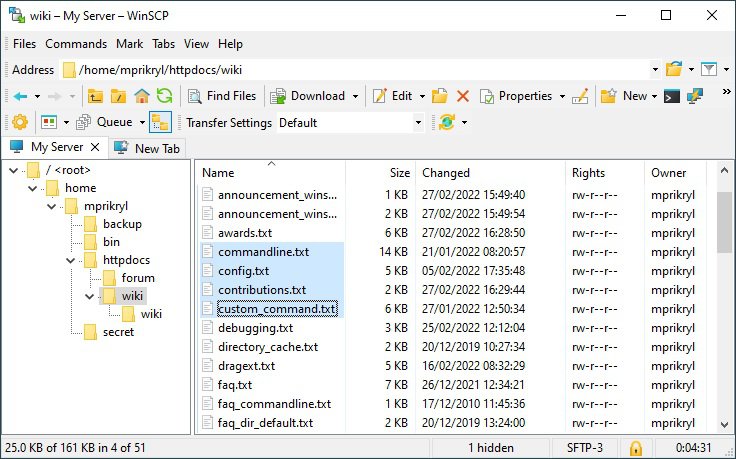
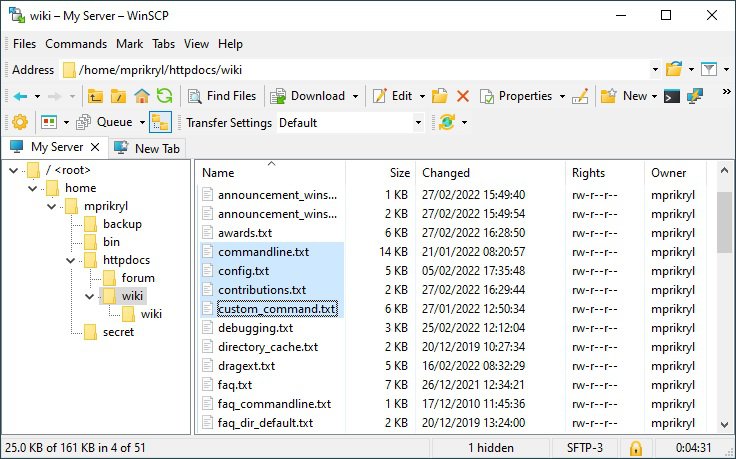
Divu paneļu saskarne:Klasisks un intuitīvs izkārtojums efektīvai failu un mapju salīdzināšanai un pārvietošanai.
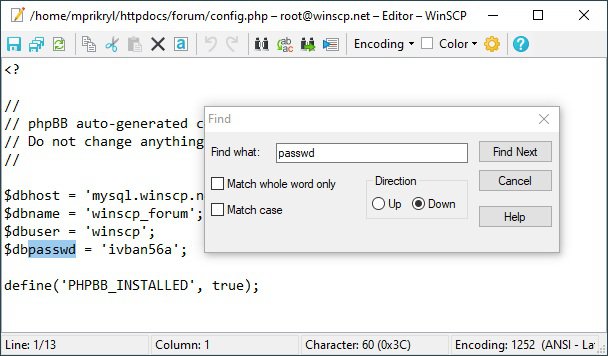
Integrēts teksta redaktors:Iespēja tieši rediģēt attālinātos failus bez nepieciešamības tos lejupielādēt un augšupielādēt manuāli.
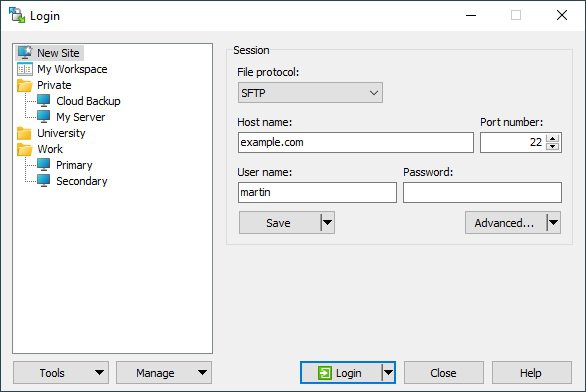
Sesiju pārvaldnieks:Ērta savienojumu saglabāšana, grupēšana un ātra piekļuve bieži izmantotiem serveriem.
Sinhronizācijas rīks:Uzlabotas iespējas automātiski vai manuāli sinhronizēt direktorijus starp vietējo un attālināto sistēmu.
How to Install / Run
1
Lejupielādējiet oficiālo WinSCP instalācijas pakotni no vietnes.
2
Palaidiet instalatoru un izpildiet ekrānā redzamos norādījumus, izvēloties vēlamos iestatījumus.
3
Atveriet programmu, ievadiet sava servera datus un izveidojiet drošu savienojumu.
Plusi / Priekšrocības
Pilnīgi bezmaksas un atvērtā pirmkoda programmatūra ar aktīvu izstrādātāju kopienu
Plaša valodu un interfeisa izvēle, tostarp latviešu valodas atbalsts
Spēcīga drošība ar SSH atslēgu, sertifikātu un šifrēšanas atbalstu
Pieejama arī portatīvā (portable) versija, kas neprasa instalēšanu
Mīnusi / Ierobežojumi
Pieejams tikai Microsoft Windows operētājsistēmai (nav oficiālas vietējās Linux vai macOS versijas)
Sarežģītākas konfigurācijas un paplašinātas skriptu iespējas prasa tehniskas zināšanas
Описание
WinSCP — это популярный, мощный и бесплатный файловый менеджер с открытым исходным кодом для Microsoft Windows, поддерживающий протоколы SFTP, SCP, FTP, WebDAV и Amazon S3. Он обеспечивает безопасную передачу файлов между локальным компьютером и удаленными серверами, предлагая как традиционный двухпанельный интерфейс, так и интеграцию с терминалом PuTTY. Инструмент отлично подходит как для системных администраторов, так и для веб-разработчиков, которым требуется удобное и безопасное управление файлами в удаленных средах. Программа поддерживает синхронизацию файлов, удаленное редактирование текста, скрипты командной строки и встроенное управление сеансами. Гибкие настройки и расширения WinSCP позволяют адаптировать интерфейс под различные рабочие процессы. Благодаря надежности и поддержке множества протоколов, программа заслуженно стала одним из ведущих инструментов для передачи файлов среди пользователей Windows.
Ключевые Особенности
Поддержка нескольких протоколов:Безопасная передача файлов через SFTP, SCP, FTP, WebDAV и Amazon S3.
Двухпанельный интерфейс:Классическая и интуитивная компоновка для эффективного сравнения и управления файлами.
Встроенный текстовый редактор:Возможность прямого редактирования удаленных файлов без ручной скачки и загрузки.
Менеджер сеансов:Удобное сохранение, группировка и быстрый доступ к часто используемым соединениям.
Инструмент синхронизации:Расширенные возможности автоматической или ручной синхронизации каталогов.
How to Install / Run
1
Скачайте официальный дистрибутив WinSCP с проверенного веб-сайта.
2
Запустите установщик и следуйте инструкциям на экране, выбрав необходимые параметры установки.
3
Запустите приложение, введите данные вашего сервера и установите безопасное соединение.
Преимущества (Плюсы)
Полностью бесплатное ПО с открытым исходным кодом и активным сообществом
Широкая языковая локализация интерфейса на десятки языков мира
Надежная безопасность с поддержкой аутентификации по ключам SSH и шифрования
Наличие портативной версии (portable), не требующей установки в систему
Недостатки (Минусы)
Доступно только для операционной системы Microsoft Windows (нет нативных версий для Linux или macOS)
Сложные сценарии автоматизации и скрипты требуют технических навыков
Description
WinSCP is a popular, powerful, and free open-source file manager for Microsoft Windows that supports SFTP, SCP, FTP, WebDAV, and Amazon S3 protocols. It provides secure file transfer between a local computer and remote servers, offering both a traditional dual-pane file manager interface and integration with the PuTTY terminal. The tool is exceptionally well-suited for both system administrators and web developers who need convenient and secure file management in remote environments. The software supports file synchronization, remote text editing, command-line scripting, and integrated session management. WinSCP's flexible settings and extensions allow users to tailor the experience to various workflows. Thanks to its reliability and broad protocol support, it has established itself as one of the leading file transfer utilities for Windows users worldwide.
Key Features
Multi-Protocol Support:Secure file transfer via SFTP, SCP, FTP, WebDAV, and Amazon S3 protocols.
Dual-Pane Interface:Classic and intuitive layout for efficient file and folder comparison and management.
Integrated Text Editor:Ability to directly edit remote files without manually downloading and re-uploading them.
Session Manager:Convenient storage, grouping, and quick access to frequently used server connections.
Synchronization Tool:Advanced options to automatically or manually synchronize directories between local and remote systems.
How to Install / Run
1
Download the official WinSCP setup package from the verified website.
2
Run the installer and follow the on-screen prompts to choose your preferred installation settings.
3
Launch the application, enter your server credentials, and establish a secure connection.
Advantages (Pros)
Completely free and open-source software with an active developer community
Extensive localization support with dozens of interface languages available
Robust security features including SSH key authentication, certificates, and encryption
Portable version available for running directly from USB drives without installation
Disadvantages (Cons)
Exclusively available for Microsoft Windows (no native Linux or macOS applications)
Advanced scripting and automation features require technical proficiency
Description
WinSCP is a popular, powerful, and free open-source file manager for Microsoft Windows that supports SFTP, SCP, FTP, WebDAV, and Amazon S3 protocols. It provides secure file transfer between a local computer and remote servers, offering both a traditional dual-pane file manager interface and integration with the PuTTY terminal. The tool is exceptionally well-suited for both system administrators and web developers who need convenient and secure file management in remote environments. The software supports file synchronization, remote text editing, command-line scripting, and integrated session management. WinSCP's flexible settings and extensions allow users to tailor the experience to various workflows. Thanks to its reliability and broad protocol support, it has established itself as one of the leading file transfer utilities for Windows users worldwide.
Key Features
Multi-Protocol Support:Secure file transfer via SFTP, SCP, FTP, WebDAV, and Amazon S3 protocols.
Dual-Pane Interface:Classic and intuitive layout for efficient file and folder comparison and management.
Integrated Text Editor:Ability to directly edit remote files without manually downloading and re-uploading them.
Session Manager:Convenient storage, grouping, and quick access to frequently used server connections.
Synchronization Tool:Advanced options to automatically or manually synchronize directories between local and remote systems.
How to Install / Run
1
Download the official WinSCP setup package from the verified website.
2
Run the installer and follow the on-screen prompts to choose your preferred installation settings.
3
Launch the application, enter your server credentials, and establish a secure connection.
Advantages (Pros)
Completely free and open-source software with an active developer community
Extensive localization support with dozens of interface languages available
Robust security features including SSH key authentication, certificates, and encryption
Portable version available for running directly from USB drives without installation
Disadvantages (Cons)
Exclusively available for Microsoft Windows (no native Linux or macOS applications)
Advanced scripting and automation features require technical proficiency
Description
WinSCP is a popular, powerful, and free open-source file manager for Microsoft Windows that supports SFTP, SCP, FTP, WebDAV, and Amazon S3 protocols. It provides secure file transfer between a local computer and remote servers, offering both a traditional dual-pane file manager interface and integration with the PuTTY terminal. The tool is exceptionally well-suited for both system administrators and web developers who need convenient and secure file management in remote environments. The software supports file synchronization, remote text editing, command-line scripting, and integrated session management. WinSCP's flexible settings and extensions allow users to tailor the experience to various workflows. Thanks to its reliability and broad protocol support, it has established itself as one of the leading file transfer utilities for Windows users worldwide.
Key Features
Multi-Protocol Support:Secure file transfer via SFTP, SCP, FTP, WebDAV, and Amazon S3 protocols.
Dual-Pane Interface:Classic and intuitive layout for efficient file and folder comparison and management.
Integrated Text Editor:Ability to directly edit remote files without manually downloading and re-uploading them.
Session Manager:Convenient storage, grouping, and quick access to frequently used server connections.
Synchronization Tool:Advanced options to automatically or manually synchronize directories between local and remote systems.
How to Install / Run
1
Download the official WinSCP setup package from the verified website.
2
Run the installer and follow the on-screen prompts to choose your preferred installation settings.
3
Launch the application, enter your server credentials, and establish a secure connection.
Advantages (Pros)
Completely free and open-source software with an active developer community
Extensive localization support with dozens of interface languages available
Robust security features including SSH key authentication, certificates, and encryption
Portable version available for running directly from USB drives without installation
Disadvantages (Cons)
Exclusively available for Microsoft Windows (no native Linux or macOS applications)
Advanced scripting and automation features require technical proficiency
LICENSE PERMISSIONS & LEGAL REFERENCE
Public Distribution Permission:OFFICIALLY PERMITTED TO REDISTRIBUTE (100% Legal Release)
(Guaranteed rights to freely download, copy, and share in unmodified form under open-source / freeware terms).
License Model & Status:GNU General Public License version 3.
Official Distribution Permission:Under the official WinSCP license (GNU General Public License 3), this software is free and permits unrestricted downloading and distribution.