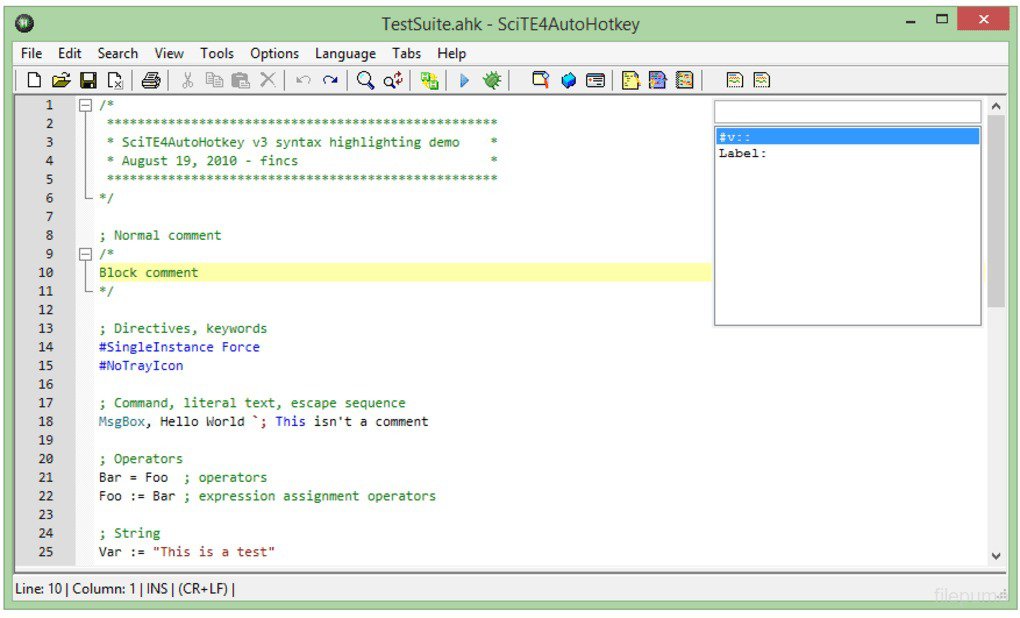
AutoHotkey ir bezmaksas un atvērtā koda pielāgota skriptu valoda, kas paredzēta Microsoft Windows videi un ļauj lietotājiem viegli izveidot tastatūras saīsnes, ātrus makrosus un automatizēt dažādus programmatūras procesus. Tā palīdz jebkura līmeņa datorlietotājiem automatizēt atkārtojošos uzdevumus jebkurā Windows lietojumprogrammā, kā arī paplašināt vai modificēt lietotāja saskarnes atbilstoši individuālajām vajadzībām. Kopš sākotnējās izlaišanas 2003. gadā, ko veica izstrādātājs Kriss Malets (Chris Mallett), rīks ir kļuvis par vienu no populārākajiem un ieteicamākajiem risinājumiem vienkāršai makroimplementācijai Windows ekosistēmā. Komplektācijā ietilpst plašs palīdzības fails, un lietotājiem ir pieejama arī visaptveroša tīmekļa dokumentācija, kas atvieglo gan iesācēju, gan pieredzējušu programmētāju darbu.
Galvenās Funkcijas
Pielāgotas tastatūras saīsnes:Ētri izveidojiet karsttaustiņus (hotkeys), lai palaistu programmas, atvērtu tīmekļa vietnes vai ievadītu iepriekš sagatavotu tekstu.
Ātra makro izveide:Automatizējiet sarežģītas taustiņu kombinācijas un peles klikšķus, lai ietaupītu laiku un samazinātu kļūdu skaitu ikdienas darbā.
Lietotāja saskarnes modificēšana:Pārceliet vai pārrakstiet noklusējuma Windows vadības taustiņu komandas, pielāgojot vidi savām prasībām.
Visaptveroša dokumentācija:Izmantojiet komplektācijā iekļauto palīdzības failu un tīmekļa resursus, lai apgūtu skriptu valodas iespējas.
Atvērtā koda elastība:Izbaudiet brīvu un atvērtā koda programmatūras priekšrocības saskaņā ar GPLv2 licenci operētājsistēmā Windows.
How to Install / Run
1
Lejupielādējiet oficiālo AutoHotkey instalācijas pakotni no uicama avota.
2
Palaidiet instalētāju un izpildiet ekrānā redzamos norādījumus, lai pabeigtu iestatīšanu.
3
Izveidojiet jaunu skripta failu, uzklikšķinot ar peles labo pogu uz darbvirsmas un izvēloties attiecīgo opciju.
Plusi / Priekšrocības
Pilnīgi bezmaksas un atvērtā koda risinājums ar aktīvu kopienu
Ļoti viegli apgūstams pamata līmenī, bet pietiekami jaudīgs sarežģītiem uzdevumiem
Samazina laiku, kas pavadīts atkārtotu datu ievadīšanai un rutīnas darbībām
Plaša dokumentācija un iebūvēti palīglīdzekļi ātrai sākšanai
Mīnusi / Ierobežojumi
Oficiāli atbalsta tikai Microsoft Windows operētājsistēmu
Sākotnējā skriptu valodas apguve var prasīt laiku lietotājiem bez priekšzināšanām
Описание
AutoHotkey — это бесплатный язык написания пользовательских сценариев с открытым исходным кодом для Microsoft Windows, разработанный главным образом для создания простых комбинаций клавиш (хоткеев), быстрых макросов и автоматизации программного обеспечения. Он позволяет пользователям с любым уровнем подготовки эффективно автоматизировать повторяющиеся задачи в любых приложениях Windows, а также настраивать и расширять пользовательский интерфейс. Первоначально выпущенный создателем Крисом Маллеттом (Chris Mallett) в 2003 году, AutoHotkey со временем стал одним из наиболее часто используемых и рекомендуемых инструментов для реализации простых макросов в среде Windows. В установочный пакет входит подробный файл справки, а также доступна полная веб-документация для пользователей любого уровня подготовки.
Ключевые Особенности
Пользовательские горячие клавиши:Легко настраивайте комбинации клавиш для запуска программ, открытия сайтов и вставки текста.
Создание быстрых макросов:Автоматизируйте повторяющиеся нажатия клавиш и щелчки мыши для повышения ежедневной производительности.
Модификация интерфейса:Переназначайте стандартные команды управления Windows под свои индивидуальные потребности.
Подробная справка:Используйте встроенный файл помощи и онлайн-документацию для быстрого освоения синтаксиса.
Открытый исходный код:Пользуйтесь возможностями бесплатной программы для автоматизации в среде Windows по лицензии GPLv2.
How to Install / Run
1
Загрузите официальный установочный пакет AutoHotkey.
2
Запустите скачанный файл и следуйте инструкциям на экране для завершения установки.
3
Создайте новый файл скрипта через контекстное меню рабочего стола, чтобы начать работу.
Преимущества (Плюсы)
Полностью бесплатное программное обеспечение с открытым исходным кодом
Низкое потребление системных ресурсов при высокой функциональности
Удобство как для простых текстовых замен, так и для создания сложных скриптов
Обширная документация и активное сообщество пользователей
Недостатки (Минусы)
Официально поддерживается только в операционной системе Microsoft Windows
Требует изучения синтаксиса скриптов для реализации сложных алгоритмов
Description
AutoHotkey is a free and open-source custom scripting language for Microsoft Windows, primarily designed to provide easy keyboard shortcuts, fast macro-creation, and software automation. It enables users of all computer skill levels to automate repetitive tasks across any Windows application, as well as easily extend or modify user interfaces to suit personal preferences and workflows. Initially released by its creator Chris Mallett in 2003, AutoHotkey has grown to become one of the most widely used and recommended utilities for straightforward macro implementation and system enhancement. The standard installation package includes an extensive help file, complemented by robust web-based documentation to support both novice users and advanced programmers.
Key Features
Custom Keyboard Shortcuts:Easily define intuitive hotkeys to launch applications, open websites, or paste canned responses.
Fast Macro Creation:Automate repetitive keystrokes and mouse clicks to streamline workflows and boost daily productivity.
User Interface Modification:Override or remap default Windows control commands and tailor the computing environment to your needs.
Extensive Help Documentation:Access comprehensive built-in help files and online resources for rapid reference and script development.
Open Source and Free:Enjoy full access to a powerful automation engine licensed under GPLv2 specifically built for Windows.
How to Install / Run
1
Download the official AutoHotkey installation package.
2
Run the installer executable and follow the standard on-screen setup prompts.
3
Create a new script file from your desktop context menu to begin writing automated shortcuts.
Advantages (Pros)
Completely free and open-source with a massive, supportive user community
Lightweight resource usage while delivering immense automation power
Steep power-to-complexity ratio allowing simple hotstrings to advanced GUI creation
Extremely well-documented with built-in guides and tutorials
Disadvantages (Cons)
Officially supported exclusively on Microsoft Windows operating systems
Requires learning a custom scripting syntax for advanced automation tasks
Description
AutoHotkey is a free and open-source custom scripting language for Microsoft Windows, primarily designed to provide easy keyboard shortcuts, fast macro-creation, and software automation. It enables users of all computer skill levels to automate repetitive tasks across any Windows application, as well as easily extend or modify user interfaces to suit personal preferences and workflows. Initially released by its creator Chris Mallett in 2003, AutoHotkey has grown to become one of the most widely used and recommended utilities for straightforward macro implementation and system enhancement. The standard installation package includes an extensive help file, complemented by robust web-based documentation to support both novice users and advanced programmers.
Key Features
Custom Keyboard Shortcuts:Easily define intuitive hotkeys to launch applications, open websites, or paste canned responses.
Fast Macro Creation:Automate repetitive keystrokes and mouse clicks to streamline workflows and boost daily productivity.
User Interface Modification:Override or remap default Windows control commands and tailor the computing environment to your needs.
Extensive Help Documentation:Access comprehensive built-in help files and online resources for rapid reference and script development.
Open Source and Free:Enjoy full access to a powerful automation engine licensed under GPLv2 specifically built for Windows.
How to Install / Run
1
Download the official AutoHotkey installation package.
2
Run the installer executable and follow the standard on-screen setup prompts.
3
Create a new script file from your desktop context menu to begin writing automated shortcuts.
Advantages (Pros)
Completely free and open-source with a massive, supportive user community
Lightweight resource usage while delivering immense automation power
Steep power-to-complexity ratio allowing simple hotstrings to advanced GUI creation
Extremely well-documented with built-in guides and tutorials
Disadvantages (Cons)
Officially supported exclusively on Microsoft Windows operating systems
Requires learning a custom scripting syntax for advanced automation tasks
Description
AutoHotkey is a free and open-source custom scripting language for Microsoft Windows, primarily designed to provide easy keyboard shortcuts, fast macro-creation, and software automation. It enables users of all computer skill levels to automate repetitive tasks across any Windows application, as well as easily extend or modify user interfaces to suit personal preferences and workflows. Initially released by its creator Chris Mallett in 2003, AutoHotkey has grown to become one of the most widely used and recommended utilities for straightforward macro implementation and system enhancement. The standard installation package includes an extensive help file, complemented by robust web-based documentation to support both novice users and advanced programmers.
Key Features
Custom Keyboard Shortcuts:Easily define intuitive hotkeys to launch applications, open websites, or paste canned responses.
Fast Macro Creation:Automate repetitive keystrokes and mouse clicks to streamline workflows and boost daily productivity.
User Interface Modification:Override or remap default Windows control commands and tailor the computing environment to your needs.
Extensive Help Documentation:Access comprehensive built-in help files and online resources for rapid reference and script development.
Open Source and Free:Enjoy full access to a powerful automation engine licensed under GPLv2 specifically built for Windows.
How to Install / Run
1
Download the official AutoHotkey installation package.
2
Run the installer executable and follow the standard on-screen setup prompts.
3
Create a new script file from your desktop context menu to begin writing automated shortcuts.
Advantages (Pros)
Completely free and open-source with a massive, supportive user community
Lightweight resource usage while delivering immense automation power
Steep power-to-complexity ratio allowing simple hotstrings to advanced GUI creation
Extremely well-documented with built-in guides and tutorials
Disadvantages (Cons)
Officially supported exclusively on Microsoft Windows operating systems
Requires learning a custom scripting syntax for advanced automation tasks
LICENSE PERMISSIONS & LEGAL REFERENCE
Public Distribution Permission:OFFICIALLY PERMITTED TO REDISTRIBUTE (100% Legal Release)
(Guaranteed rights to freely download, copy, and share in unmodified form under open-source / freeware terms).
License Model & Status:GNU General Public License v2.0.
Official Distribution Permission:Under the official AutoHotkey license (GPLv2), this software is free and permits unrestricted downloading and distribution.