
Title
Attention Anonymous User!Your download speed is severely restricted. Registered users download at full speed without waiting. Register now!
CrystalDiskMark v. 9.0.3
Drivers & System Toolsv. 9.0.3

Original Descriptions
🇱🇻Latvian
🇷🇺Russian
🇬🇧English
Instant Translation
🇩🇪Deutsch
🇪🇸Español
🇫🇷Français
🇪🇪Eesti
🇱🇹Lietuvių
🇵🇱Polski
🇺🇦Українська
🇮🇹Italiano
🇵🇹Português
🇫🇮Suomi
🇸🇪Svenska
🇳🇴Norsk
🇨🇳中文
🇯🇵日本語
Operating System
Windows
11108/8.17
Architecture
64-bit (x64)
Apraksts
CrystalDiskMark ir populārs un jaudīgs atvērta pirmkoda disku dziņu veiktspējas testēšanas rīks, kas paredzēts Microsoft Windows operētājsistēmām un ko izstrādājis Noriyuki Miyazaki no Crystal Dew World. Balstīts uz Microsoft MIT licencēto Diskspd rīku, šis grafiskais benchmarks plaši tiek izmantots cietvielu diskdziņu (SSD), tradicionālo cieto disku (HDD), USB zibatmiņu un citu datu nesēju ātruma mērīšanai. Programma darbojas, veicot lasīšanas un rakstīšanas operācijas caur failu sistēmu tilpuma atkarīgā veidā, ļaujot lietotājiem iegūt precīzus datus par datu apstrādes ātrumu reālos apstākļos. Galvenās Funkcijas
- Secīgā un nejaušā veiktspēja: Ģenerē lasīšanas un rakstīšanas ātrumus secīgās un nejaušās pozīcijās, lai pilnībā novērtētu diska potenciālu.
- Maināmas rindas un plūsmas: Nodrošina iespēju testēt veiktspēju ar mainīgu rindu un plūsmu skaitu, simulējot gan ikdienas lietošanu, gan smagas servera slodzes.
- Diskspd dzinējs: Izmanto Microsoft uzticamo un MIT licencēto Diskspd rīku kā pamatu precīziem un uzticamiem mērījumiem.
- Vienkāršs un vizuāls interfeiss: Piedāvā ērtu, grafisku saskarni, kas ļauj viegli pārskatīt rezultātus megabaitos sekundē vai IOPS.
- Atvērts pirmkods: Programma ir pilnībā bezmaksas un pieejama saskaņā ar MIT licenci, nodrošinot caurskatāmību un drošību.
How to Install / Run
- 1Lejupielādējiet oficiālo CrystalDiskMark instalācijas vai portatīvo pakotni savam datoram.
- 2Atveriet lejupielādēto failu un palaidiet programmas instalēšanas vedni vai palaidiet to tieši no ZIP arhīva.
- 3Izvēlieties vajadzīgo disku, testēšanas reizes un izmēru, pēc tam noklikšķiniet uz pogas 'All', lai sāktu pilno veiktspējas testu.
Plusi / Priekšrocības
- Pilnīgi bezmaksas un atvērta pirmkoda risinājums
- Ļoti precīzi un standartizēti rezultāti SSD un HDD testēšanai
- Viegli saprotams un lietotājam draudzīgs grafiskais interfeiss
- Atbalsta plašu datu nesēju klāstu un dažādus testēšanas parametrus
Mīnusi / Ierobežojumi
- Intensīvi testi var radīt papildu nolietojumu zemas kvalitātes datu nesējiem
- Paredzēts galvenokārt Windows videi (makroversijas ir pieejamas tikai kā trešo pušu kloni)
Описание
CrystalDiskMark — это популярный и мощный инструмент с открытым исходным кодом для тестирования производительности дисковых накопителей в операционной системе Microsoft Windows, созданный Нориюки Миядзаки из Crystal Dew World. Основанный на утилите Diskspd от Microsoft с лицензией MIT, этот графический бенчмарк широко используется для оценки скорости твердотельных накопителей (SSD), жестких дисков (HDD) и внешних носителей. Программа выполняет операции чтения и записи через файловую систему с учетом объема диска, генерируя показатели скорости в последовательных и случайных позициях при разном количестве очередей и потоков. Ключевые Особенности
- Тестирование последовательного и случайного ввода-вывода: Измеряет скорость чтения и записи для оценки реальной производительности накопителя.
- Гибкая настройка очередей и потоков: Позволяет изменять параметры очередей и потоков для симуляции различных сценариев нагрузки от повседневных задач до серверных систем.
- Надежный движок Diskspd: Использует проверенную технологию Microsoft Diskspd для обеспечения максимальной точности и достоверности результатов.
- Удобный графический интерфейс: Предоставляет простой и понятный интерфейс с отображением результатов в мегабайтах в секунду или IOPS.
- Открытый исходный код: Программа распространяется бесплатно по лицензии MIT, гарантируя прозрачность и безопасность использования.
How to Install / Run
- 1Загрузите официальный установщик или портативную версию CrystalDiskMark на свой компьютер.
- 2Запустите скачанный файл установки или распакуйте архив в удобную для вас папку.
- 3Выберите целевой диск, количество прогонов и объем данных, затем нажмите кнопку 'All' для запуска полного теста.
Преимущества (Плюсы)
- Полностью бесплатное программное обеспечение с открытым кодом
- Признанный стандарт индустрии для быстрой оценки SSD и HDD
- Простой и лаконичный интерфейс без лишней рекламы
- Возможность гибкой настройки параметров тестирования
Недостатки (Минусы)
- Частое проведение тяжелых тестов создает дополнительную нагрузку на ресурс накопителей
- Нативная версия доступна только для ОС Windows
Description
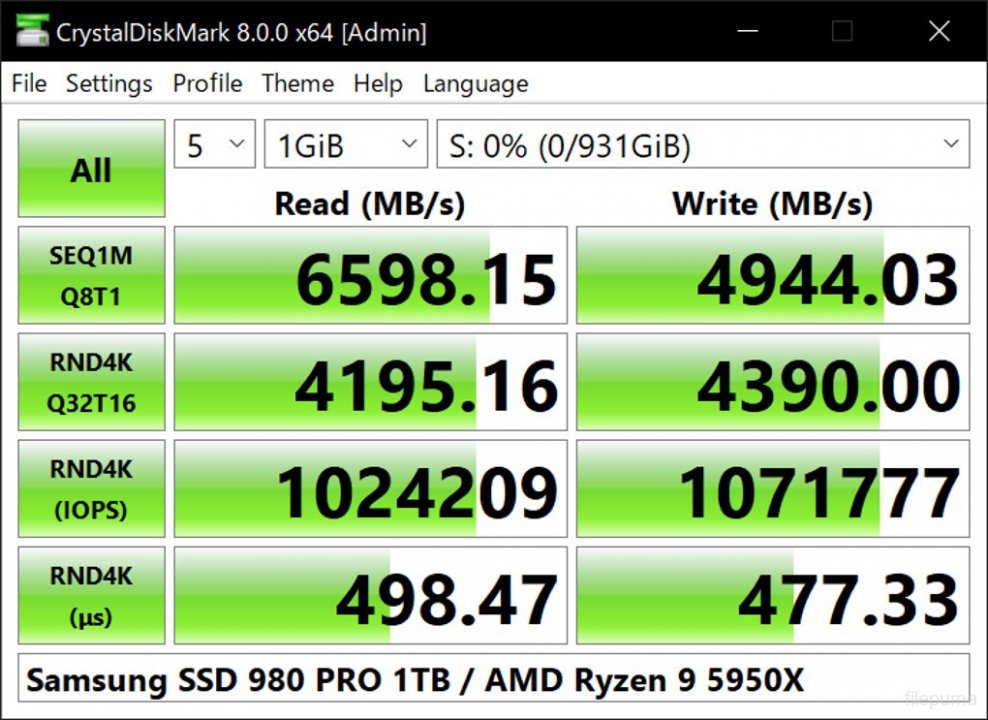
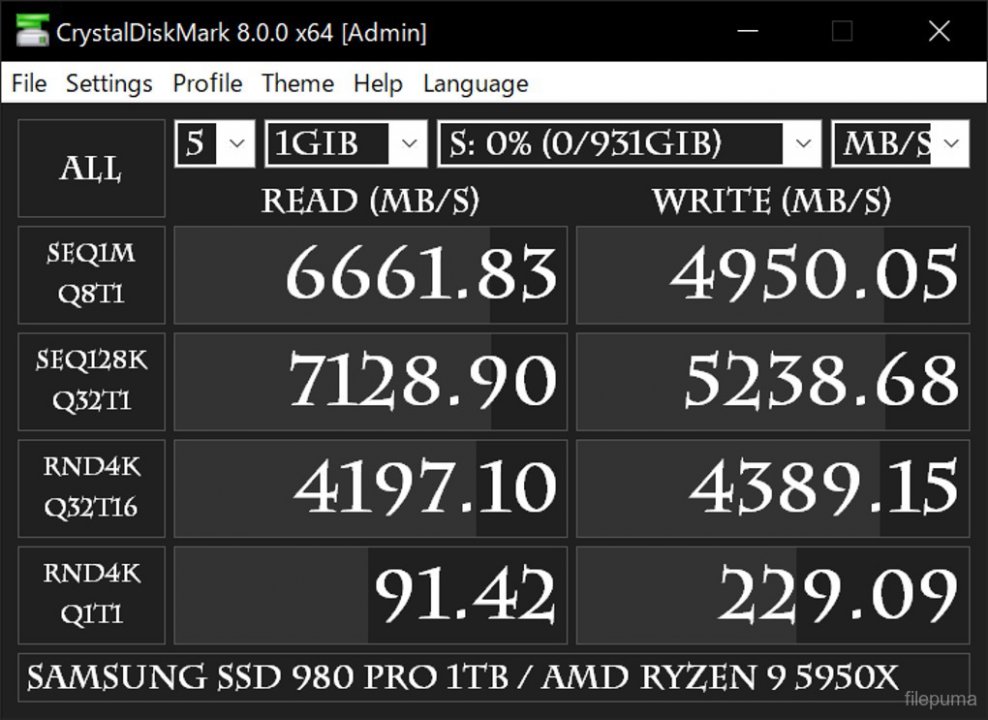
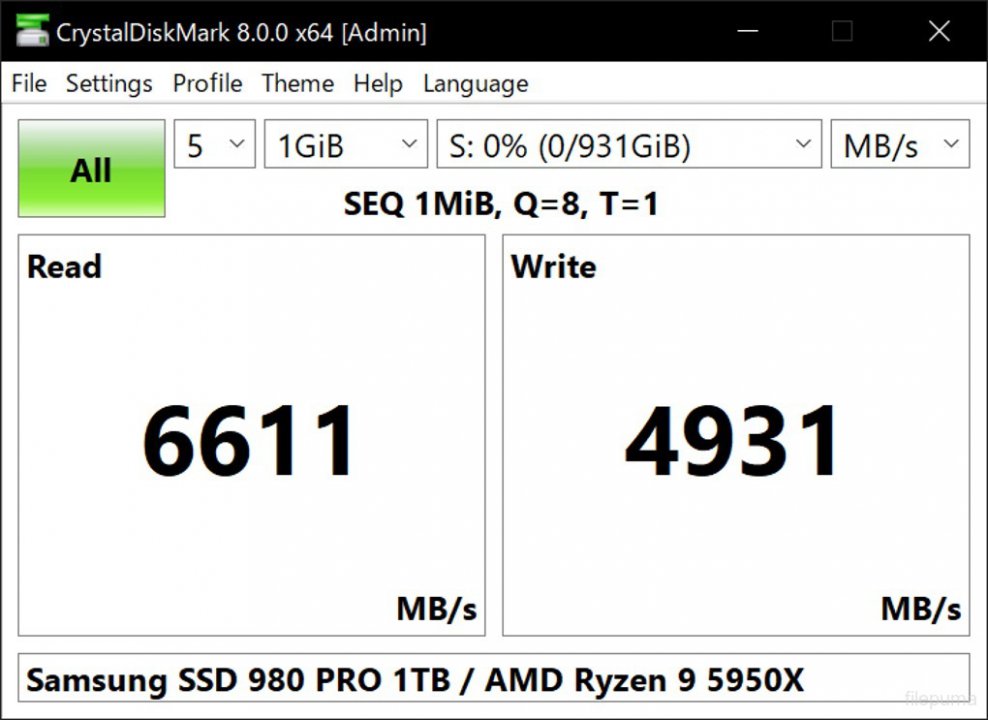
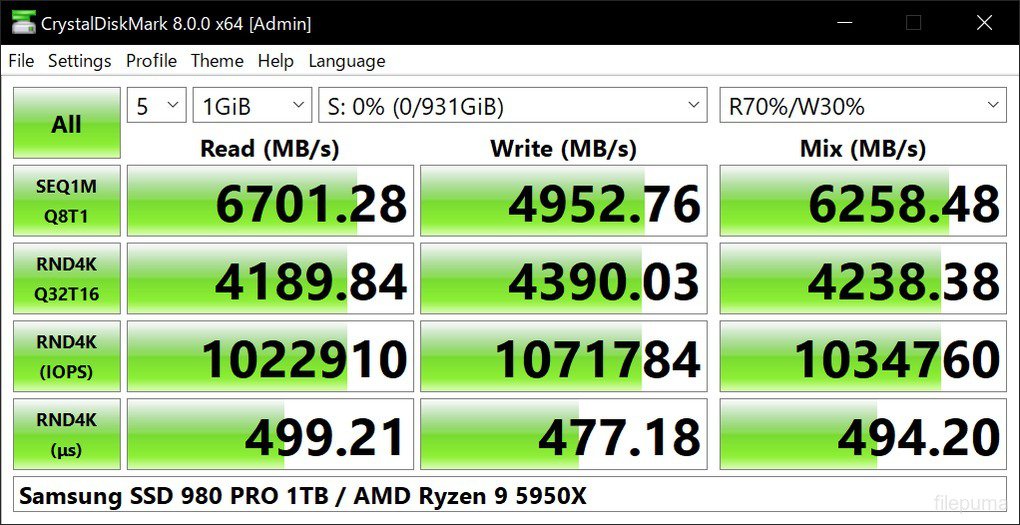
CrystalDiskMark is a premier open source disk drive benchmark tool for Microsoft Windows developed by Noriyuki Miyazaki from Crystal Dew World. Based on Microsoft's MIT-licensed Diskspd tool, this graphical benchmark is widely utilized by enthusiasts and professionals for testing the performance of solid-state storage (SSDs), hard disk drives (HDDs), and removable media. It operates by performing read and writing operations through the filesystem in a volume-dependent manner, generating precise read and write speeds in sequential and random positions with varying numbers of queues and threads. Key Features
- Sequential and Random IO Testing: Measures read and write speeds across sequential and random positions to thoroughly evaluate drive capabilities.
- Customizable Queues and Threads: Allows testing with varying numbers of queues and threads to simulate real-world workloads from desktop use to enterprise servers.
- Powered by Diskspd Engine: Built upon Microsoft's robust and MIT-licensed Diskspd tool, guaranteeing accurate, industry-standard benchmark results.
- Clean Graphical Interface: Features an intuitive, easy-to-read dashboard displaying performance metrics clearly in MB/s or IOPS.
- Open Source and Free: Distributed freely under the permissive MIT license, ensuring transparency and reliable community-driven updates.
How to Install / Run
- 1Download the official CrystalDiskMark installer or portable edition package to your system.
- 2Execute the downloaded setup file or extract the portable archive to your preferred directory.
- 3Select your target drive, test count, and data size from the interface, then click the 'All' button to begin benchmarking.
Advantages (Pros)
- Completely free and open source with no hidden costs
- Industry standard for testing SSD and HDD performance accurately
- Lightweight, fast, and does not clutter the system
- Highly configurable test sizes, counts, and parameters
Disadvantages (Cons)
- Heavy benchmark runs can induce wear on older or lower-end flash storage
- Native application is restricted to Microsoft Windows environments
Description
CrystalDiskMark is a premier open source disk drive benchmark tool for Microsoft Windows developed by Noriyuki Miyazaki from Crystal Dew World. Based on Microsoft's MIT-licensed Diskspd tool, this graphical benchmark is widely utilized by enthusiasts and professionals for testing the performance of solid-state storage (SSDs), hard disk drives (HDDs), and removable media. It operates by performing read and writing operations through the filesystem in a volume-dependent manner, generating precise read and write speeds in sequential and random positions with varying numbers of queues and threads. Key Features
- Sequential and Random IO Testing: Measures read and write speeds across sequential and random positions to thoroughly evaluate drive capabilities.
- Customizable Queues and Threads: Allows testing with varying numbers of queues and threads to simulate real-world workloads from desktop use to enterprise servers.
- Powered by Diskspd Engine: Built upon Microsoft's robust and MIT-licensed Diskspd tool, guaranteeing accurate, industry-standard benchmark results.
- Clean Graphical Interface: Features an intuitive, easy-to-read dashboard displaying performance metrics clearly in MB/s or IOPS.
- Open Source and Free: Distributed freely under the permissive MIT license, ensuring transparency and reliable community-driven updates.
How to Install / Run
- 1Download the official CrystalDiskMark installer or portable edition package to your system.
- 2Execute the downloaded setup file or extract the portable archive to your preferred directory.
- 3Select your target drive, test count, and data size from the interface, then click the 'All' button to begin benchmarking.
Advantages (Pros)
- Completely free and open source with no hidden costs
- Industry standard for testing SSD and HDD performance accurately
- Lightweight, fast, and does not clutter the system
- Highly configurable test sizes, counts, and parameters
Disadvantages (Cons)
- Heavy benchmark runs can induce wear on older or lower-end flash storage
- Native application is restricted to Microsoft Windows environments
Description
CrystalDiskMark is a premier open source disk drive benchmark tool for Microsoft Windows developed by Noriyuki Miyazaki from Crystal Dew World. Based on Microsoft's MIT-licensed Diskspd tool, this graphical benchmark is widely utilized by enthusiasts and professionals for testing the performance of solid-state storage (SSDs), hard disk drives (HDDs), and removable media. It operates by performing read and writing operations through the filesystem in a volume-dependent manner, generating precise read and write speeds in sequential and random positions with varying numbers of queues and threads. Key Features
- Sequential and Random IO Testing: Measures read and write speeds across sequential and random positions to thoroughly evaluate drive capabilities.
- Customizable Queues and Threads: Allows testing with varying numbers of queues and threads to simulate real-world workloads from desktop use to enterprise servers.
- Powered by Diskspd Engine: Built upon Microsoft's robust and MIT-licensed Diskspd tool, guaranteeing accurate, industry-standard benchmark results.
- Clean Graphical Interface: Features an intuitive, easy-to-read dashboard displaying performance metrics clearly in MB/s or IOPS.
- Open Source and Free: Distributed freely under the permissive MIT license, ensuring transparency and reliable community-driven updates.
How to Install / Run
- 1Download the official CrystalDiskMark installer or portable edition package to your system.
- 2Execute the downloaded setup file or extract the portable archive to your preferred directory.
- 3Select your target drive, test count, and data size from the interface, then click the 'All' button to begin benchmarking.
Advantages (Pros)
- Completely free and open source with no hidden costs
- Industry standard for testing SSD and HDD performance accurately
- Lightweight, fast, and does not clutter the system
- Highly configurable test sizes, counts, and parameters
Disadvantages (Cons)
- Heavy benchmark runs can induce wear on older or lower-end flash storage
- Native application is restricted to Microsoft Windows environments
LICENSE PERMISSIONS & LEGAL REFERENCE
- Public Distribution Permission: OFFICIALLY PERMITTED TO REDISTRIBUTE (100% Legal Release)
(Guaranteed rights to freely download, copy, and share in unmodified form under open-source / freeware terms). - License Model & Status: MIT License.
- Official Distribution Permission: Under the official CrystalDiskMark license (MIT), this software is free and permits unrestricted downloading and distribution.
- Official Project Homepage: https://crystalmark.info/en/.
- Exact License & Terms Link: https://opensource.org/licenses/MIT.
- Official License Registry (Alternative Legal Source): https://opensource.org/licenses/MIT.
Images
Similar / Other Versions
No similar torrents found.
Technical Specifications
- DeveloperKatsura Shareware
- Release Date23.05.2026
- Operating SystemWindows11108/8.17
- Architecture64-bit (x64)
- Release FormatSetup / Installer Portable
- Languages🌍🇱🇻🇷🇺🇬🇧🇺🇦🇩🇪🇫🇷
- Official Homepagecrystalmark.info/en
- filesView (1)
System Requirements
- Processor (CPU)1 GHz or faster 64-bitu processor
- Memory (RAM)1 GB
- Free Disk Space50 MB
- Graphics Card (GPU)Standard display (No dedicated GPU required)
Rating
None
Said thanks
📢 Advertisement[+]
Want to be seen by everyone?Place your ad here using your site balance! The perfect spot to promote your releases, clan, or links.Your text ad here!Grab this spot using your accumulated balance and get noticed.VPNMost people overpay for a VPN without realising it. CometVPN starts from just $1.89/month — same privacy, same security, same speeds as the big names. Just without the big price tag.
+ Add your advertisement
📂 files (1)
×
| Path | Size |
|---|---|
| CrystalDiskMark9_0_3.exe | 4.31 MB |
❮
×
![]()
❯
Share on Facebook
Choose the image you want to see in your Facebook post:
Choose which image you want to see in your Facebook post and click "Share this image":
 Screenshot 1
 Screenshot 2
 Screenshot 3
 Screenshot 4
 Screenshot 5
Facebook will automatically load the selected image in your post preview!
Facebook will automatically load the chosen image in the post preview.
🌐 All Supported Languages 33
🇬🇧
English
EN
🇯🇵
Japanese
日本語
JA
🇨🇳
Chinese (Simplified)
简体中文
ZH-CN
🇹🇼
Chinese (Traditional)
繁體中文
ZH-TW
🇷🇺
Russian
Русский
RU
🇩🇪
German
Deutsch
DE
🇫🇷
French
Français
FR
🇪🇸
Spanish
Español
ES
🇮🇹
Italian
Italiano
IT
🇧🇷
Portuguese (Brazil)
Português (Brasil)
PT-BR
🇵🇹
Portuguese
Português
PT
🇵🇱
Polish
Polski
PL
🇹🇷
Turkish
Türkçe
TR
🇳🇱
Dutch
Nederlands
NL
🇰🇷
Korean
한국어
KO
🇺🇦
Ukrainian
Українська
UK
🇨🇿
Czech
Čeština
CS
🇭🇺
Hungarian
Magyar
HU
🇷🇴
Romanian
Română
RO
🇧🇬
Bulgarian
Български
BG
🇬🇷
Greek
Ελληνικά
EL
🇮🇱
Hebrew
עברית
HE
🇮🇩
Indonesian
Bahasa Indonesia
ID
🇻🇳
Vietnamese
Tiếng Việt
VI
🇸🇪
Swedish
Svenska
SV
🇩🇰
Danish
Dansk
DA
🇫🇮
Finnish
Suomi
FI
🇳🇴
Norwegian
Norsk
NO
🇸🇰
Slovak
Slovenčina
SK
🇭🇷
Croatian
Hrvatski
HR
🇷🇸
Serbian
Srpski
SR
🇱🇹
Lithuanian
Lietuvių
LT
🇱🇻
Latvian
Latviešu
LV
No matching languages found
Total supported languages: 33