Hello, Guest!
Title
Attention Anonymous User!Your download speed is severely restricted. Registered users download at full speed without waiting. Register now!

Poster
Ventoy v. 1.1.17
CD / DVD & USB Toolsv. 1.1.17
15.88 MB Report Torrent
👤
UploadedAnonymous
📅
Added21.09.2026 11:02
💾
Size15.88 MB
👁️
Views21
🎯
Hits3
⚖️
Seeders / Leechers2 / 0
✅
Snatched2
×Banner
Operating System
Windows
11108/8.17
Architecture
64-bit (x64)
Description
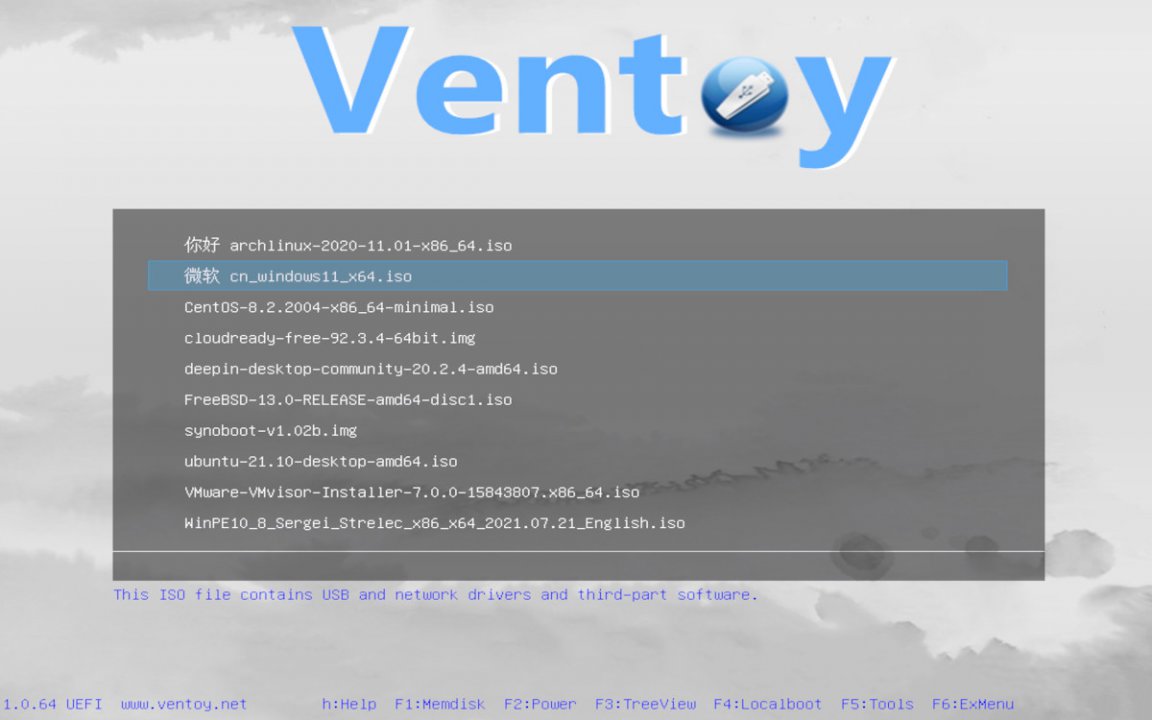
Ventoy is a partially open-source utility designed for creating bootable USB media storage devices and physical drives. It fundamentally changes how users handle installation media by eliminating the need to reformat the USB drive every time a new operating system image needs to be added. Once Ventoy is installed onto the USB drive, users can simply copy various image files such as .iso, .wim, .img, .vhd(x), and .efi directly onto the storage. Upon booting from the USB drive, Ventoy presents a clean and responsive boot menu allowing the user to select the desired operating system or diagnostic utility. This robust solution significantly optimizes workflows for IT professionals, system administrators, and tech enthusiasts who frequently manage multiple distributions of Windows, Linux, and specialized recovery environments. Supporting both Legacy BIOS and UEFI architectures, Ventoy guarantees broad hardware compatibility and reliable performance across diverse motherboard types. Developed by longpanda, Ventoy continues to evolve as an industry standard for multi-boot USB creation, offering unmatched flexibility and convenience.
Key Features
  • No-Format Image Management: Easily copy and paste .iso, .wim, .img, and other files directly onto the USB drive without reformatting it for every new image.
  • Extensive Format Support: Native compatibility with a wide variety of bootable image types including ISO, WIM, IMG, VHD(x), and EFI files.
  • Dual Boot Modes: Seamlessly supports both Legacy BIOS and modern UEFI systems, including compatibility with Secure Boot environments.
  • Automation and Scripting Support: Built-in capabilities for unattended and automated operating system installations using deployment scripts.
  • Multi-Purpose Storage: Retain normal storage functionality on the USB drive, allowing you to use the remaining space for standard personal data files.

How to Install / Run
  • 1
    Download the official Ventoy package and extract the archive on your local computer.
  • 2
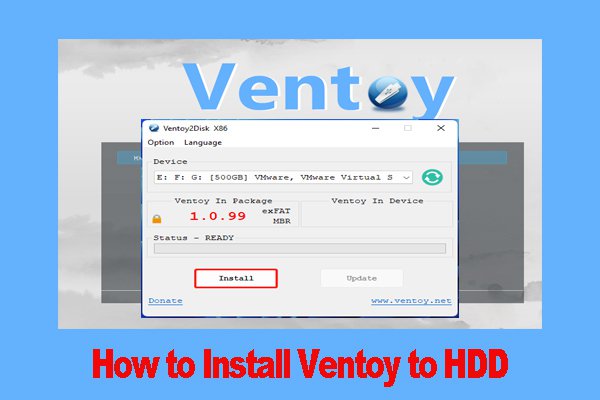
    Connect your target USB flash drive and launch the Ventoy installation executable, selecting your USB device from the list.
  • 3
    Click the 'Install' button to prepare the drive, and afterwards simply drag and drop your ISO files onto the Ventoy partition.

Advantages (Pros)

  • Massive time saver by removing the repetitive requirement to format and rewrite USB drives.
  • Allows multiple OS installers and rescue environments to coexist on a single affordable USB stick.
  • Exceptional hardware compatibility spanning older Legacy machines and cutting-edge UEFI systems.
  • Cross-platform support with intuitive graphical user interfaces for Windows and Linux environments.
Disadvantages (Cons)

  • Care must be taken during the initial setup to select the correct drive to prevent accidental data loss.
  • Certain niche or heavily customized OS images may occasionally require specialized boot parameters.

Images
Similar / Other Versions
No similar torrents found.
Technical Specifications
  • Developerlongpanda (Ventoy)
  • Release Date24.07.2026
  • Operating System
    Windows
    11108/8.17
  • Architecture64-bit (x64)
  • Release FormatSetup / Installer
  • Languages🌍🇷🇺🇬🇧🇺🇦🇩🇪🇫🇷🇪🇸
  • Official Homepageventoy.net
  • filesView (1)
System Requirements
  • Processor (CPU)1 GHz x86-64 Processor
  • Memory (RAM)512 MB
  • Free Disk Space100 MB
  • Graphics Card (GPU)Standard display (No dedicated GPU required)
Rating
None
Said thanks
📢 Advertisement[+]
+ Add your advertisement
📂 files (1) ×
PathSize
ventoy-1.1.17-windows.zip15.88 MB
❮
×
❯
Report Torrent ×
2 + 5 =
🌐 All Supported Languages 35
🇬🇧
English
EN
🇨🇳
Chinese (Simplified) 简体中文
ZH-CN
🇹🇼
Chinese (Traditional) 繁體中文
ZH-TW
🇩🇪
German Deutsch
DE
🇫🇷
French Français
FR
🇷🇺
Russian Русский
RU
🇪🇸
Spanish Español
ES
🇮🇹
Italian Italiano
IT
🇧🇷
Portuguese (Brazil) Português (Brasil)
PT-BR
🇵🇹
Portuguese Português
PT
🇵🇱
Polish Polski
PL
🇹🇷
Turkish Türkçe
TR
🇳🇱
Dutch Nederlands
NL
🇯🇵
Japanese 日本語
JA
🇰🇷
Korean 한국어
KO
🇸🇦
Arabic العربية
AR
🇨🇿
Czech Čeština
CS
🇭🇺
Hungarian Magyar
HU
🇺🇦
Ukrainian Українська
UK
🇬🇷
Greek Ελληνικά
EL
🇮🇩
Indonesian Bahasa Indonesia
ID
🇻🇳
Vietnamese Tiếng Việt
VI
🇷🇴
Romanian Română
RO
🇧🇬
Bulgarian Български
BG
🇹🇭
Thai ไทย
TH
🇮🇱
Hebrew עברית
HE
🇮🇷
Persian فارسی
FA
🇸🇪
Swedish Svenska
SV
🇩🇰
Danish Dansk
DA
🇫🇮
Finnish Suomi
FI
🇳🇴
Norwegian Norsk
NO
🇸🇰
Slovak Slovenčina
SK
🇭🇷
Croatian Hrvatski
HR
🇷🇸
Serbian Srpski
SR
🇱🇹
Lithuanian Lietuvių
LT
Total supported languages: 35