
Title
Attention Anonymous User!Your download speed is severely restricted. Registered users download at full speed without waiting. Register now!

AVG Antivirus Free v. 26.9.11503.0
Antivirus & Securityv. 26.9.11503.0

Original Descriptions
🇱🇻Latvian
🇷🇺Russian
🇬🇧English
Instant Translation
🇩🇪Deutsch
🇪🇸Español
🇫🇷Français
🇪🇪Eesti
🇱🇹Lietuvių
🇵🇱Polski
🇺🇦Українська
🇮🇹Italiano
🇵🇹Português
🇫🇮Suomi
🇸🇪Svenska
🇳🇴Norsk
🇨🇳中文
🇯🇵日本語
Operating System
Windows
11107
Architecture
64-bit (x64)
Quote:Bezsaistes versija (Offline Installer)Šis laidiens satur pilno bezsaistes instalācijas pakotni. Programmas uzstādīšanai nav nepieciešams aktīvs interneta savienojums un papildu failu lejupielāde instalēšanas laikā.
Apraksts
AVG Antivirus Free nodrošina visaptverošu un uzticamu aizsardzību pret vīrusiem, spiegprogrammatūru, spiegprogrammatūras draudiem un citiem mūsdienu digitālajiem riskiem. Šī versija piedāvā pilnu autonoms bezsaistes instalētāju (offline installer), kas ļauj veikt pilnīgu un drošu programmatūras uzstādīšanu datorā bez nepieciešamības pēc aktīva interneta pieslēguma vai papildu tiešsaistes lejupielādēm instalācijas laikā. Tas padara šo pakotni īpaši piemērotu sistēmu administratoriem un lietotājiem, kuriem nepieciešams uzstādīt drošības risinājumus ierobežotas savienojamības vidēs.
Programmatūras jaunākā iterācija ietver modernizētu dzinēju, kas efektīvi analizē failus reāllaikā, bloķē bīstamas saites un novērš ļaunprātīgu piekļuvi personas datiem. Programmas interfeiss ir kļuvis vēl intuitīvāks, ļaujot lietotājiem viegli veikt pilnas sistēmas pārbaudes, pārvaldīt karantīnu un pielāgot drošības iestatījumus atbilstoši personīgajām prasībām. Viss process notiek fonā, būtiski neietekmējot datora kopējo veiktspēju un ļaujot ikdienā strādāt bez traucējumiem.
Galvenās Funkcijas
- Pilns bezsaistes instalētājs: Šī versija satur pilnu autonoms bezsaistes instalētāju, kas nodrošina pilnīgu instalāciju bez aktīva interneta pieslēguma vai tiešsaistes lejupielādes vajadzības.
- Reāllaika vīrusu aizsardzība: Uzlabotais dzinējs nepārtraukti uzrauga sistēmu un bloķē vīrusus, spiegprogrammatūru, Trojas zirgus un citus ļaunprātīgos kodus.
- Viedā tīmekļa drošība: Pārbauda apmeklētās tīmekļa lapas, brīdina par aizdomīgām saitēm un efektīvi bloķē pikšķerēšanas mēģinājumus.
- Veiktspējas optimizācija: Darbojas fonā ar minimālu resursu patēriņu, nodrošinot, ka sistēma nepalēninās ikdienas darba laikā.
- Vienkārša pārvaldība: Pārskatāms un moderns lietotāja interfeiss, kas ļauj ērti uzsākt sistēmas skenēšanu un pārvaldīt atklātos draudus.
How to Install / Run
- 1Palaidiet lejupielādēto bezsaistes instalācijas failu tieši no savas ierīces.
- 2Sekojiet instalātāja ekrāna norādījumiem, izvēloties sev nepieciešamos iestatījumus.
- 3Pabeidziet uzstādīšanu un veiciet pirmo sistēmas pārbaudi, lai nodrošinātu pilnīgu datora drošību.
Plusi / Priekšrocības
- Iespējams instalēt pilnīgi bezsaistē bez interneta savienojuma
- Spēcīga pamata aizsardzība bez maksas
- Zems sistēmas resursu patēriņš fona režīmā
- Viegli saprotams un lietotājam draudzīgs interfeiss
Mīnusi / Ierobežojumi
- Uzlabotās funkcijas un papildu moduļi prasa maksas abonementu
- Bezmaksas versijā laiku pa laikam var tikt piedāvāti papildu produkti
Quote:Автономная версия (Offline Installer)Данный релиз содержит полный автономный офлайн-дистрибутив. Для установки программы не требуется подключение к интернету и дополнительная загрузка файлов.
Описание
AVG Antivirus Free предоставляет надежную и комплексную защиту от вирусов, шпионского ПО, программ-вымогателей и других актуальных цифровых угроз. Данный выпуск представляет собой полноценный автономный оффлайн-установщик (offline installer), что позволяет выполнить полную установку антивируса без необходимости подключения к интернету или использования онлайн-загрузчиков во время настройки. Это идеальное решение для развертывания защиты в изолированных сетях или при нестабильном интернет-соединении.
Программа оснащена усовершенствованным защитным механизмом, который анализирует файлы в реальном времени, блокирует вредоносные ссылки и предотвращает несанкционированный доступ к личным данным. Интуитивно понятный пользовательский интерфейс позволяет легко запускать сканирование системы, управлять карантином и настраивать параметры безопасности. Антивирус работает незаметно в фоновом режиме, не снижая общую производительность компьютера и обеспечивая безопасность каждый день.
Ключевые Особенности
- Полноценный оффлайн-установщик: Этот релиз включает автономный пакет установки, позволяющий полностью установить программу без подключения к интернету во время процесса.
- Защита в реальном времени: Усовершенствованный движок непрерывно проверяет систему и мгновенно блокирует вирусы, шпионские программы и трояны.
- Веб-безопасность и защита почты: Проверяет посещаемые сайты, предупреждает о подозрительных ссылках и эффективно блокирует фишинговые атаки.
- Минимальное влияние на систему: Работает эффективно в фоновом режиме с низким потреблением системных ресурсов, не замедляя работу ПК.
- Простой и понятный интерфейс: Современная панель управления позволяет легко управлять защитой, запускать сканирование и проверять статус безопасности.
How to Install / Run
- 1Запустите загруженный автономный оффлайн-установщик на вашем компьютере.
- 2Следуйте простым инструкциям на экране мастера установки.
- 3Завершите процесс установки и выполните первую проверку системы для обеспечения безопасности.
Преимущества (Плюсы)
- Установка возможна полностью в оффлайн-режиме без интернета
- Надежная базовая защита компьютера абсолютно бесплатно
- Низкое потребление системных ресурсов при фоновой работе
- Удобный, русифицированный и простой в использовании интерфейс
Недостатки (Минусы)
- Расширенные функции и дополнительные модули доступны только в платной версии
- Периодически могут появляться предложения обновить версию до PRO
Quote:Offline Version (Offline Installer)This release includes the complete standalone offline setup package. No internet connection or additional file downloads are required during installation.
Description
AVG Antivirus Free delivers robust and comprehensive protection against viruses, spyware, ransomware, and other modern digital threats. This release is provided as a full standalone offline installer, allowing a complete and seamless installation without requiring an active internet connection or online web-downloader during setup. This is exceptionally beneficial for setting up security in isolated environments or managing multiple offline workstations.
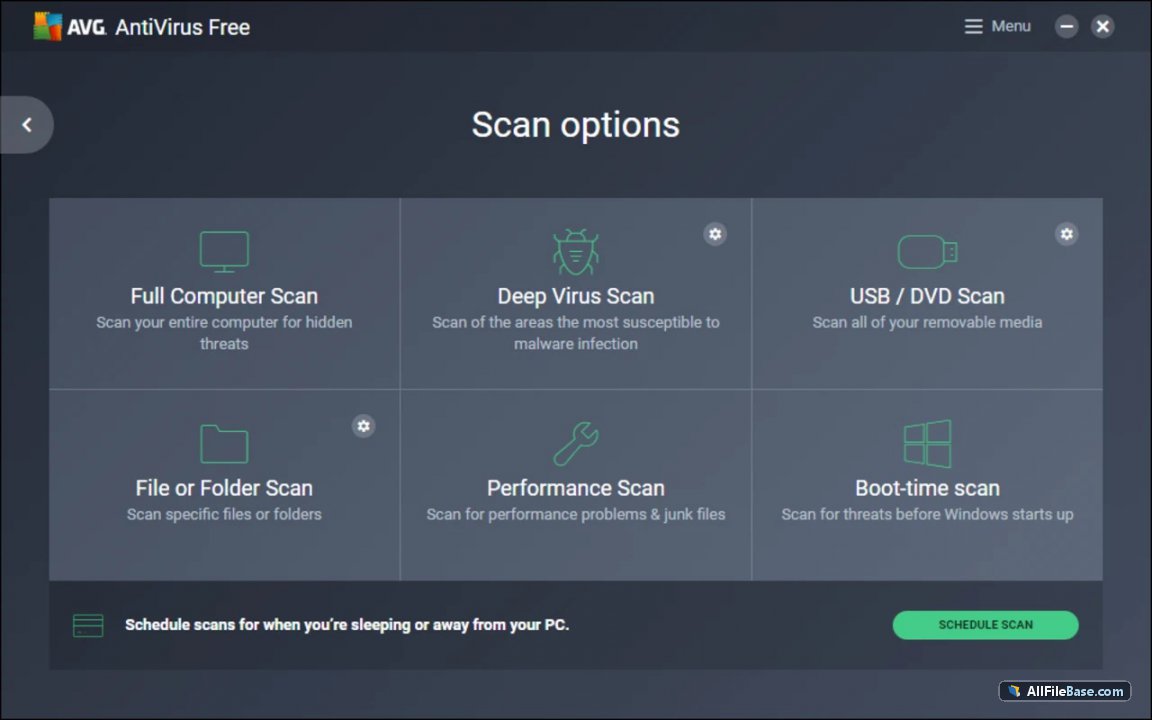
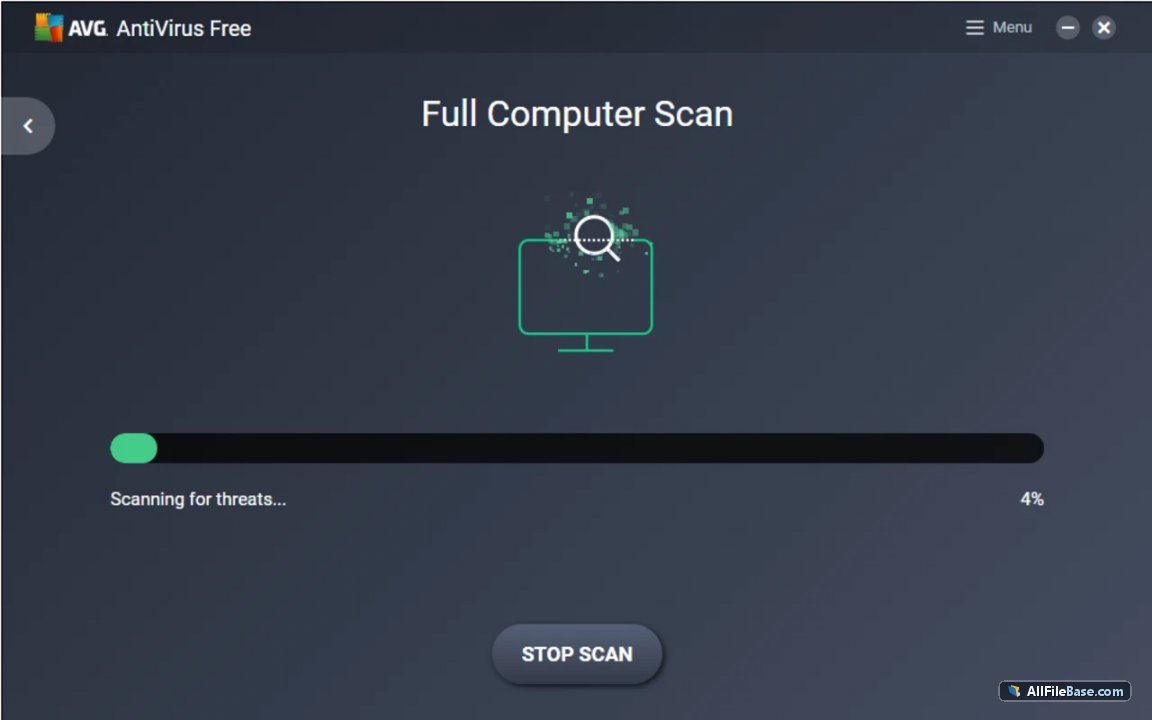
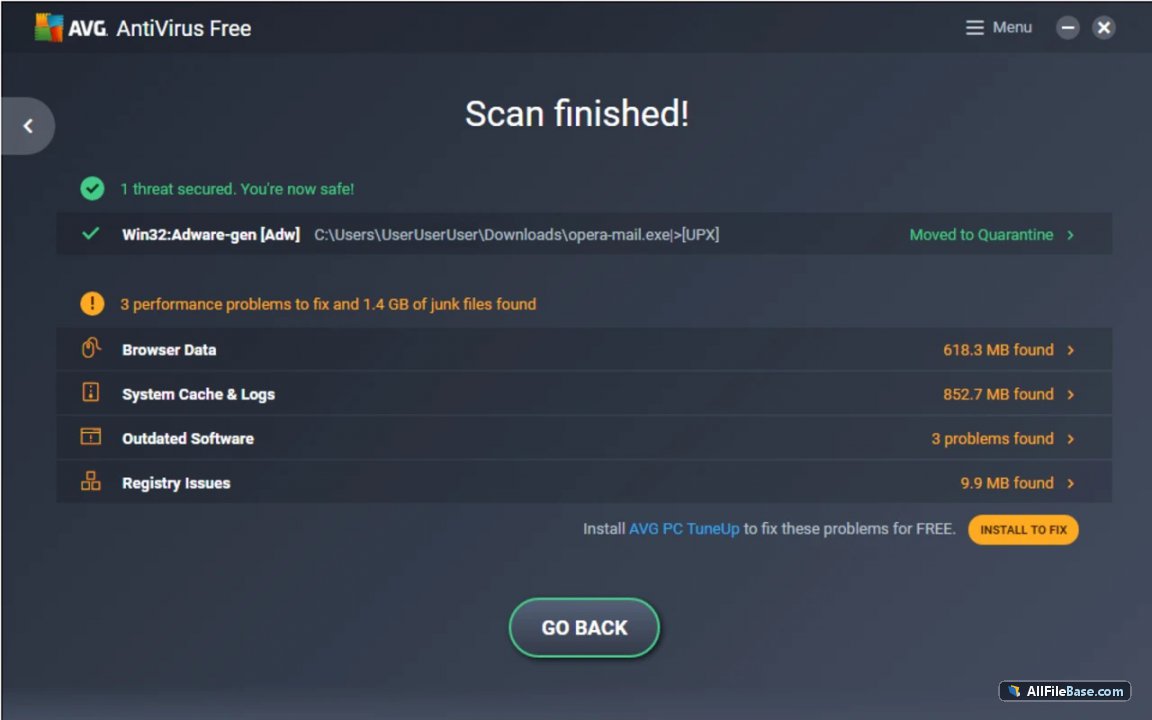
The software features an advanced scanning engine that analyzes files in real-time, blocks malicious links, and prevents unauthorized access to personal files. The modern user interface simplifies navigation, allowing users to effortlessly run system scans, manage quarantine items, and configure security preferences. Operating quietly in the background, it ensures your system remains fully protected without impacting daily performance or slowing down your computer.
Key Features
- Complete Offline Installer: This release features the full standalone offline installer, enabling complete installation without any network dependency or internet connection during setup.
- Real-Time Threat Detection: Advanced detection engine continuously monitors your system to block viruses, spyware, trojans, and ransomware instantly.
- Web & Email Shield: Inspects websites, flags dangerous links, and blocks phishing attempts to keep your online activities secure.
- Low System Impact: Operates efficiently in the background with minimal CPU and RAM usage, ensuring your computer stays fast.
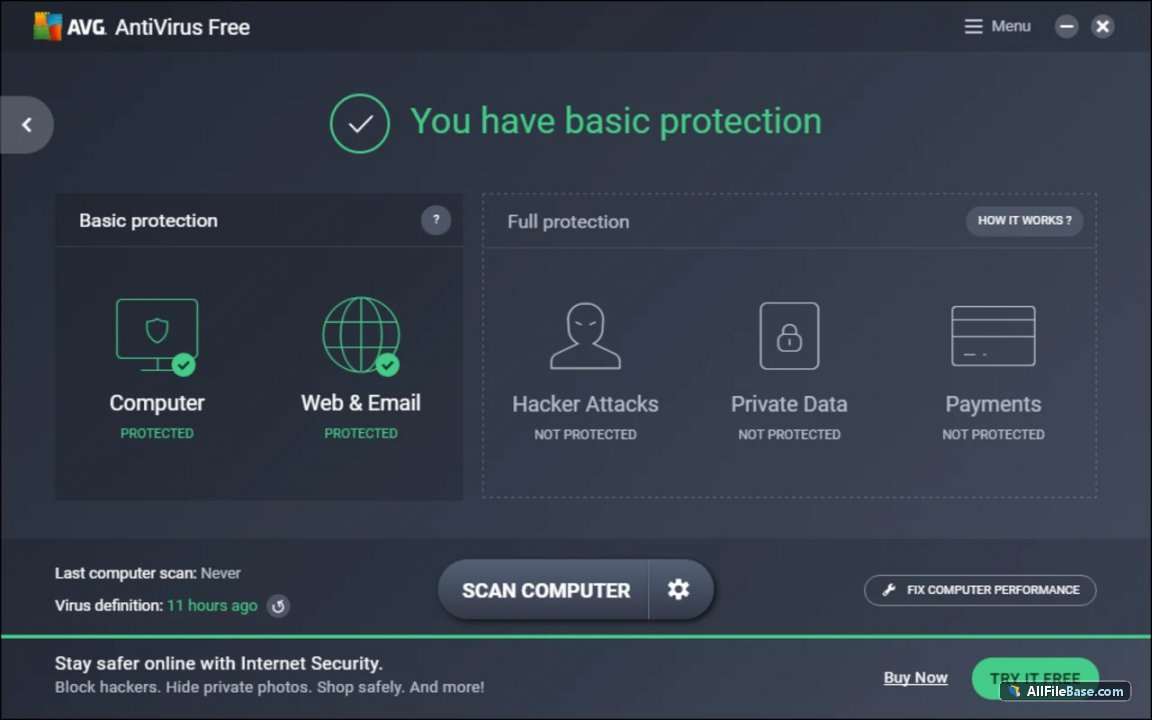
- Intuitive Dashboard: Clean, modernized interface that makes running scans, checking updates, and managing security status effortless.
How to Install / Run
- 1Execute the downloaded standalone offline installer file on your computer.
- 2Follow the straightforward on-screen setup prompts to complete the installation.
- 3Finish the setup process and run an initial system scan to secure your PC.
Advantages (Pros)
- Full standalone offline installer requires no active internet during setup
- Reliable and proven core virus protection completely free of charge
- Minimal system resource consumption during background monitoring
- User-friendly and straightforward interface for all user levels
Disadvantages (Cons)
- Advanced features and specialized modules require upgrading to a paid plan
- Promotional prompts for paid upgrades may occasionally appear
Quote:Offline Version (Offline Installer)This release includes the complete standalone offline setup package. No internet connection or additional file downloads are required during installation.
Description
AVG Antivirus Free delivers robust and comprehensive protection against viruses, spyware, ransomware, and other modern digital threats. This release is provided as a full standalone offline installer, allowing a complete and seamless installation without requiring an active internet connection or online web-downloader during setup. This is exceptionally beneficial for setting up security in isolated environments or managing multiple offline workstations.
The software features an advanced scanning engine that analyzes files in real-time, blocks malicious links, and prevents unauthorized access to personal files. The modern user interface simplifies navigation, allowing users to effortlessly run system scans, manage quarantine items, and configure security preferences. Operating quietly in the background, it ensures your system remains fully protected without impacting daily performance or slowing down your computer.
Key Features
- Complete Offline Installer: This release features the full standalone offline installer, enabling complete installation without any network dependency or internet connection during setup.
- Real-Time Threat Detection: Advanced detection engine continuously monitors your system to block viruses, spyware, trojans, and ransomware instantly.
- Web & Email Shield: Inspects websites, flags dangerous links, and blocks phishing attempts to keep your online activities secure.
- Low System Impact: Operates efficiently in the background with minimal CPU and RAM usage, ensuring your computer stays fast.
- Intuitive Dashboard: Clean, modernized interface that makes running scans, checking updates, and managing security status effortless.
How to Install / Run
- 1Execute the downloaded standalone offline installer file on your computer.
- 2Follow the straightforward on-screen setup prompts to complete the installation.
- 3Finish the setup process and run an initial system scan to secure your PC.
Advantages (Pros)
- Full standalone offline installer requires no active internet during setup
- Reliable and proven core virus protection completely free of charge
- Minimal system resource consumption during background monitoring
- User-friendly and straightforward interface for all user levels
Disadvantages (Cons)
- Advanced features and specialized modules require upgrading to a paid plan
- Promotional prompts for paid upgrades may occasionally appear
Quote:Offline Version (Offline Installer)This release includes the complete standalone offline setup package. No internet connection or additional file downloads are required during installation.
Description
AVG Antivirus Free delivers robust and comprehensive protection against viruses, spyware, ransomware, and other modern digital threats. This release is provided as a full standalone offline installer, allowing a complete and seamless installation without requiring an active internet connection or online web-downloader during setup. This is exceptionally beneficial for setting up security in isolated environments or managing multiple offline workstations.
The software features an advanced scanning engine that analyzes files in real-time, blocks malicious links, and prevents unauthorized access to personal files. The modern user interface simplifies navigation, allowing users to effortlessly run system scans, manage quarantine items, and configure security preferences. Operating quietly in the background, it ensures your system remains fully protected without impacting daily performance or slowing down your computer.
Key Features
- Complete Offline Installer: This release features the full standalone offline installer, enabling complete installation without any network dependency or internet connection during setup.
- Real-Time Threat Detection: Advanced detection engine continuously monitors your system to block viruses, spyware, trojans, and ransomware instantly.
- Web & Email Shield: Inspects websites, flags dangerous links, and blocks phishing attempts to keep your online activities secure.
- Low System Impact: Operates efficiently in the background with minimal CPU and RAM usage, ensuring your computer stays fast.
- Intuitive Dashboard: Clean, modernized interface that makes running scans, checking updates, and managing security status effortless.
How to Install / Run
- 1Execute the downloaded standalone offline installer file on your computer.
- 2Follow the straightforward on-screen setup prompts to complete the installation.
- 3Finish the setup process and run an initial system scan to secure your PC.
Advantages (Pros)
- Full standalone offline installer requires no active internet during setup
- Reliable and proven core virus protection completely free of charge
- Minimal system resource consumption during background monitoring
- User-friendly and straightforward interface for all user levels
Disadvantages (Cons)
- Advanced features and specialized modules require upgrading to a paid plan
- Promotional prompts for paid upgrades may occasionally appear
LICENSE PERMISSIONS & LEGAL REFERENCE
- Public Distribution Permission: OFFICIALLY PERMITTED TO REDISTRIBUTE (100% Legal Release)
(Guaranteed rights to freely download, copy, and share in unmodified form under open-source / freeware terms). - License Model & Status: Bez maksas (Freemium).
- Official Distribution Permission: Under the official AVG Antivirus Free license (Freemium), this software is free and permits unrestricted downloading and distribution.
- Official Project Homepage: https://www.avg.com.
- Exact License & Terms Link: https://www.avg.com/en-ww/eula.
- Official License Registry (Alternative Legal Source): https://www.avg.com.
Images
Similar / Other Versions
No similar torrents found.
Technical Specifications
- DeveloperAVG Technologies (Gen Digital)
- Release Date16.09.2026
- Operating SystemWindows11107
- Architecture64-bit (x64)
- Release FormatSetup / Installer
- Languages🌍🇱🇻🇷🇺🇬🇧🇺🇦🇩🇪🇫🇷
- Official Homepageavg.com
- filesView (1)
System Requirements
- Processor (CPU)1.5 GHz or faster processor with SSE2 instruction set support
- Memory (RAM)1 GB
- Free Disk Space2 GB
- Graphics Card (GPU)Standard display (No dedicated GPU required)
Rating
None
Said thanks
📢 Advertisement[+]
VPNMost people overpay for a VPN without realising it. CometVPN starts from just $1.89/month — same privacy, same security, same speeds as the big names. Just without the big price tag.Want to be seen by everyone?Place your ad here using your site balance! The perfect spot to promote your releases, clan, or links.Your text ad here!Grab this spot using your accumulated balance and get noticed.
+ Add your advertisement
📂 files (1)
×
| Path | Size |
|---|---|
| avg_antivirus_free_offline_26.9.11503.0_setup.exe | 1.08 GB |
❮
×
![]()
❯
Share on Facebook
Choose the image you want to see in your Facebook post:
Choose which image you want to see in your Facebook post and click "Share this image":
 Screenshot 1
 Screenshot 2
 Screenshot 3
 Screenshot 4
 Screenshot 5
Facebook will automatically load the selected image in your post preview!
Facebook will automatically load the chosen image in the post preview.
🌐 All Supported Languages 36
🇬🇧
English
EN
🇱🇻
Latvian
Latviešu
LV
🇷🇺
Russian
Русский
RU
🇩🇪
German
Deutsch
DE
🇫🇷
French
Français
FR
🇪🇸
Spanish
Español
ES
🇮🇹
Italian
Italiano
IT
🇯🇵
Japanese
日本語
JA
🇨🇳
Chinese
中文
ZH
🇵🇱
Polish
Polski
PL
🇵🇹
Portuguese
Português
PT
🇳🇱
Dutch
Nederlands
NL
🇸🇪
Swedish
Svenska
SV
🇫🇮
Finnish
Suomi
FI
🇺🇦
Ukrainian
Українська
UK
🇨🇿
Czech
Čeština
CS
🇩🇰
Danish
Dansk
DA
🇭🇺
Hungarian
Magyar
HU
🇰🇷
Korean
한국어
KO
🇹🇷
Turkish
Türkçe
TR
🇬🇷
Greek
Ελληνικά
EL
🇳🇴
Norwegian
Norsk
NO
🇪🇸
Catalan
Català
CA
🇷🇴
Romanian
Română
RO
🇮🇩
Indonesian
Bahasa Indonesia
ID
🇸🇰
Slovak
Slovenčina
SK
🇸🇮
Slovenian
Slovenščina
SL
🇻🇳
Vietnamese
Tiếng Việt
VI
🇧🇬
Bulgarian
Български
BG
🇪🇪
Estonian
Eesti
ET
🇱🇹
Lithuanian
Lietuvių
LT
🇭🇷
Croatian
Hrvatski
HR
🇷🇸
Serbian
Srpski
SR
🇸🇦
Arabic
العربية
AR
🇮🇱
Hebrew
עברית
HE
🇹🇭
Thai
ไทย
TH
No matching languages found
Total supported languages: 36